01 Overview
BlenderHub is a single-page web IDE for headless Blender 4.5 LTS, running in a Docker container with the Blender binary baked into the image. From a browser on the LAN you create file-based projects, edit bpy Python in a Monaco editor, run scripts in background Blender processes with the console streaming live, render .blend files with Cycles, and preview the results. It also generates the scripts for you: an LLM writes bpy from a natural-language prompt, and separate pipelines turn text or an uploaded image into a 3D model. It doubles as a render backend that other services on the server can call.
Write or generate bpy
A Monaco editor for Python, or an LLM that writes the bpy for you — a Standard mode and a parametric Geometry-Nodes mode — over a 13-model selector routed through LiteLLM.
Text / image → 3D
Turn a prompt or an uploaded image into a 3D model: Shap-E locally, or Meshy.ai and Tripo3D in the cloud, dropped straight into the project.
Cycles queue + preview
Run scripts and render .blend files headless with Cycles; renders land in a gallery and models open in an embedded Online3DViewer.
02 Why I built it
BlenderHub is one node of a small constellation of AI services on my home server. The goal was practical: make Blender scriptable and renderable from any browser on the LAN, with no desktop Blender install, and give other services a render backend to call. There isn't a formal motivation doc — this is reconstructed from the task summaries — but the rapid sequence of same-week fixes shows where the real problem was. It wasn't building the IDE; it was making an LLM's generated bpy script actually produce a visible render, unattended.
03 What I built & how it works
A Flask + Socket.IO app in front of a Blender binary, with a self-healing job runner in between.
Fig. 1 — the app orchestrates; Blender runs headless per job; generated scripts are patched and self-healed before their output is swept back into the project.
- Describe or write — type a
bpyscript in Monaco, or generate one from a prompt in Standard or Geometry-Nodes Procedural mode. - Patch — a regex pass rewrites Blender 3.x API calls to 4.x and injects a camera auto-aim before the first render.
- Run — Blender runs headless in a background process; stdout streams to the console line by line.
- Self-heal — if a traceback appears, the runner strips the offending line, retries once, and saves the fix as a learned patch for future scripts.
- Collect — any image,
.blend, or mesh written to/tmpis swept into the project; renders show in the gallery, models open in the 3D preview.
04 🛠 Skills & tech used
05 Notable challenges & decisions
Most of the work was making an LLM's generated bpy survive contact with a real Blender process.
LLMs hallucinate bpy attributes — so I stopped trusting them at three layers
Generated scripts used renamed 3.x properties or invented ones that don't exist. I attacked it at three layers: a Blender 4.x migration cheat-sheet in the system prompt, a runtime regex patcher that rewrites known API breaks, and build-time introspection that dumps the real Blender API into the prompt — "if a property isn't in this verified list, it doesn't exist." The design escalated from manual rules to auto-retry to learned patches to a grounded prompt.
Blender exits 0 even when a script raises
A crashed render still reported "done." The runner scans stdout for AttributeError tracebacks — tolerating Python 3.11's caret-underline lines — strips the offending line, retries once, and persists the (type, attribute) pair to a learned-patches file so future scripts are cleaned pre-emptively.
Solid-grey renders because the camera pointed at the floor
The default camera aims down its -Z axis, so many generated scenes rendered as flat grey. The fix was geometric, not a code fix: inject a bounding-box-centre auto-aim (to_track_quat) before the first render — but only when the camera is pointed steeply at the floor or ceiling.
CDNs aren't a given on a home LAN
Two separate incidents — Socket.IO, then Online3DViewer (which also had a wrong published filename) — drove vendoring those libraries locally. Bundling didn't fix it at first: Monaco's AMD loader was hijacking the UMD bundles' global registration, fixed purely by script order. Honest note: Monaco itself still loads from a CDN, so the editor pane needs internet.
AI scripts wrote renders to /tmp, then they vanished
/tmp is unmounted and cleared, and scripts saved renders with arbitrary names. Two iterations of a collector — an exact-prefix glob, then all image / blend / mesh files filtered by modification time since the job started, with collision-safe renaming — swept them back into the project.
Where I drew the line. Jobs live in memory — a restart clears the history, but projects and files persist on disk; that was an accepted tradeoff. The service runs unauthenticated on the LAN only: the script runner is arbitrary code execution by design, so it must never be exposed publicly as-is.
06 Results
Sources: source-tree line counts, task summaries, and the running container's config (survey 2026-07-31).
07 Screenshots
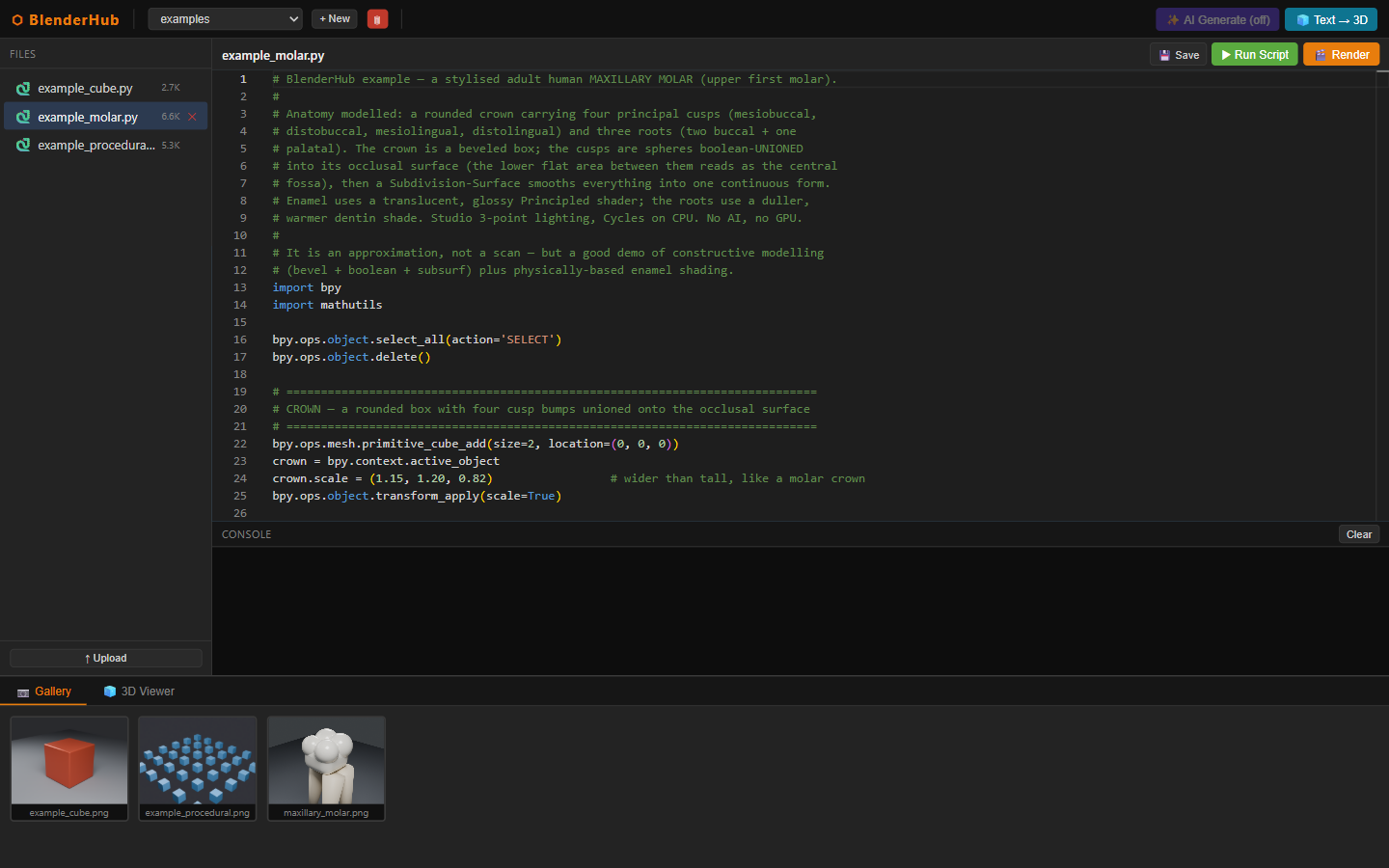
bpy editor and a WebSocket console driving Blender 4.5 with no display.
08 Honest status
The service was built in late February 2026 and hardened heavily over the following days, then ran essentially untouched — no code changes since early March, still up on the home server as a LAN-only tool. Some of that original setup has since drifted: the GPU rendering that once offloaded to a second machine was dropped from the current compose config, so renders run on CPU, and the demo projects directory is now empty. What ships here instead is a runnable, key-free clone (a three-tier recipe): Blender 4.5 is baked into the image, and three example scripts render end-to-end out of the box. In the original fleet, 3D generation was offloaded to a GPU machine; the clone falls back to CPU. Nothing here is production-grade — no authentication, and the script runner executes arbitrary Python by design — but as a personal tool and a render backend, it did its job.
BlenderHub — Build Recipe
Take a bare machine to a running copy of BlenderHub — a self-hosted,
headless-3D web IDE. In the browser you create a project, write a Blender
Python (bpy) script in a Monaco editor, and click ▶ Run; the server
executes it against a baked-in Blender 4.5 as a headless subprocess,
streams the console live over WebSocket, and sweeps rendered images / 3D models
into a per-project gallery and an in-browser 3D viewer. An optional
AI Generate feature turns a natural-language prompt into a bpy script, and
an optional Shap-E service does key-free local text-to-3D.
Everything runs on CPU — no GPU required. The default demo is key-free.
Status: ✅ Verified 2026-08-01 — built from this clean clone with a single
docker compose up --build. The image builds (Blender 4.5.12 LTS baked in + its Python API introspected at build time), the container comes up healthy, and on first run it seeds anexamplesproject. All three seed scripts were run through the app's own pipeline (/run→ headless Blender →/tmpsweep → gallery) and produced real Cycles/CPU renders key-free: a beveled metallic cube, a parametric Geometry-Nodes cube grid, and a shaded maxillary molar (seedemo.png/molar_render.png). The AI Generate button correctly shows disabled with no LLM configured (/api/ai/models→enabled:false), and Monaco is vendored locally (served from/static, no CDN). Both opt-in profiles were exercised:--profile llmflips the AI gate on (/api/ai/models→enabled:true, models listed via the bundled LiteLLM gateway), and--profile 3dShap-E boots, is auto-detected by the UI, downloads its model, and generated a 20-frame preview GIF on CPU (~7.6 min; it auto-detects and uses a GPU when present). The clean clone lives inclone/. All three tiers are covered — run the prebuilt container (a singleblenderhubtarball, ~1505 MB, verified 2026-08-01), build the image from source, or run bare-metal on Linux/macOS.Sensitive data — read this. Nothing personal ships. A grep of the whole source for names, LAN IPs,
.localhosts, personal paths, and hardcoded secrets came back clean; a fresh install seeds zero user projects (theexamplesproject is generic geometry). No API keys are embedded anywhere — every credential reads from the environment with an empty default.
What it is
A single container (Flask + Flask-SocketIO over eventlet, one port 8106):
app.py— REST + WebSocket server: project/file CRUD, job run/render, live output, optional AI-generate and text/image→3D routes.blender_runner.py— runs Blender headless as a subprocess and streams stdout. Three layers keep AI-written scripts alive on Blender 4.5: a regex 3.x→4.x compat patcher, anAttributeErrorscrape-and-retry, and a build-time-bakedblender_api.jsonof verified API names injected into the LLM prompt.ai_client.py— optional AI generation against any OpenAI-compatible endpoint (off by default).- Frontend —
templates/index.html+static/app.js: Monaco editor (vendored), Online-3D-Viewer (vendored), Socket.IO (vendored). No CDN.
Prerequisites
New machine? Install the base tools first — see ../SETUP.md.
| Tier | You need |
|---|---|
| 1 — prebuilt container (recommended) | Docker Desktop / Engine (see ../SETUP.md). Nothing else — Blender, all system libs, and Python deps are baked into the image. |
| 2 — build from source | Docker Desktop / Engine. Builds Blender + all deps from the Dockerfile. |
| 3 — bare-metal | Blender 4.5 on PATH (or via BLENDER_PATH) and Python 3.11, on a Linux/macOS host (the job runner uses POSIX process groups; it does not run natively on Windows — use Docker or WSL there). |
Configuration — everything is optional
docker compose up needs no .env and no keys. Everything below is opt-in
(see .env.example):
| Setting | Unlocks | Without it |
|---|---|---|
--profile llm + LITELLM_* |
AI Generate (prompt → bpy script) |
AI button shown but disabled |
--profile 3d |
Local Shap-E text→3D (key-free) | Text→3D shows "not configured" |
MESHY_API_KEY / TRIPO_API_KEY |
Cloud text/image→3D (GLB meshes) | those providers stay hidden |
CYCLES_DEVICE=GPU |
GPU Cycles (needs a CUDA base + nvidia runtime) | CPU rendering (default) |
Tier 1 — Run the prebuilt container(s) (recommended)
Availability: the prebuilt image bundle is available on request — it is not published or linked anywhere. Ask Kevin for it, or build everything from source via Tier 2/3 below.
Already have the offline tarball? Load it and start — no build step:
docker load -i blenderhub-image.tar        # ~1505 MB (Blender 4.5 baked in)
cd clone
docker compose up -d                        # → http://localhost:8106  (no --build)
curl -s localhost:8106/api/blender/version  # → "Blender 4.5.12 LTS ..."
To produce the tarball, run this once on a machine that has already built the image (see Tier 2):
docker save blenderhub -o blenderhub-image.tar # ~1505 MB
The tarball is honestly large because Blender 4.5 is baked into the single
blenderhub image. The two opt-in profiles are not in it: --profile
llm pulls ghcr.io/berriai/litellm:main-latest, and --profile 3d builds the
separate blenderhub-shap-e image (~7.7 GB) — save that one on its own if you
want it offline (docker save blenderhub-shap-e -o blenderhub-shape-image.tar).
Tier 2 — Build the image from source
cd clone
docker compose up -d --build          # → http://localhost:8106
No keys, no .env. On first boot the entrypoint seeds an examples project
(three bpy scripts). Open http://localhost:8106, pick a script in the
sidebar, and click ▶ Run Script — watch the Blender console stream and the
render appear in the Gallery tab.
Tier 3 — Bare-metal (Linux / macOS)
cd clone
pip install -r requirements.txt
# Blender 4.5 must be installed; point BLENDER_PATH at its binary.
BLENDER_PATH=/opt/blender/blender PROJECTS_DIR=./projects python app.py   # :8106
(The core renderer needs no GPU and no display — headless Cycles/CPU.)
Optional: AI Generate (LLM)
The AI feature talks to any OpenAI-compatible endpoint and is off by default. Turnkey path = the bundled LiteLLM proxy:
# put a provider key in .env (see .env.example), then:
docker compose --profile llm up -d --build
.env.example documents both a cloud path (LiteLLM + OPENAI/ANTHROPIC/
GEMINI_API_KEY) and a fully local, key-free path (point LITELLM_URL at a
host Ollama /v1 — no gateway needed). The app uses two generic aliases
(cloud-model, local-model) mapped to real providers in litellm.config.yaml.
Optional: Shap-E local text→3D
Key-free local text-to-3D, bundled as an opt-in service:
docker compose --profile 3d up -d --build # adds local Shap-E (no keys)
Heavy add-on: a multi-GB image + a ~1–2 GB model download on first use. It uses
a local NVIDIA GPU automatically if present (auto-detected — see the commented
deploy block in docker-compose.yml), otherwise CPU (slow, minutes per
generation). The UI only offers Shap-E once the service is actually up.
Profiles compose freely: docker compose --profile llm --profile 3d up.
Verify
curl -s localhost:8106/api/blender/version        # → "Blender 4.5.12 LTS ..."
curl -s localhost:8106/                           # → 200 HTML "BlenderHub"
curl -s localhost:8106/api/ai/models              # → {"enabled":false,...} (AI off)
curl -s localhost:8106/api/projects               # → {"projects":["examples"]}
End-to-end render (key-free, no GPU) — run a seed script and confirm it collects a render into the gallery:
JID=$(curl -s -X POST localhost:8106/api/projects/examples/run \
       -H 'Content-Type: application/json' -d '{"filename":"example_cube.py"}' \
       | grep -oE '"job_id":"[^"]+"')
# poll GET /api/jobs/<id> until "status":"done", then:
curl -s localhost:8106/api/projects/examples/renders   # → lists example_cube.png
Notes & gotchas
- No GPU needed. Rendering always uses Cycles;
CYCLES_DEVICEdefaults toCPU. TheGPUpath is opt-in and self-guards back to CPU when no CUDA device is found. This is the "collapse the optional GPU offload → local (single-machine)" step — the clone runs on any plain machine. - Blender download resilience.
download.blender.orgsits behind a Cloudflare bot-challenge that 403s automated (CI/Docker)wget. The Dockerfile therefore pulls Blender 4.5.12 from Blender's official public mirrors (falling back todownload.blender.orglast) and verifies a pinned SHA256. BumpBLENDER_VERSION+BLENDER_SHA256together to update; any 4.5.x LTS patch shares the same API. - Monaco is vendored under
static/monaco/— the IDE works fully offline (Socket.IO and the 3D viewer were already vendored). - Blender exits 0 even on a script exception, so the runner scrapes stdout for
AttributeErrortracebacks and retries once with the offending lines stripped — one of three layers that make LLM-written 3.x-style scripts survive on 4.5. - POSIX-only runner. Cancel uses process groups (
killpg), so bare-metal needs Linux/macOS; on Windows use Docker (the image is Linux) or WSL.
Provenance — data / model (core: no training, no GPU)
The core app trains nothing and needs no GPU. Blender 4.5.12 LTS is
downloaded at build time (mirror + pinned SHA256) and baked into the image; its
Python API is introspected once at build to produce blender_api.json. The three
seed scripts are generic geometry (a cube, a Geometry-Nodes grid, an anatomical
molar approximation) — no personal data, no external assets. The optional AI
feature calls a user-supplied LLM (no weights ship). The optional Shap-E
service pulls openai/shap-e from HuggingFace at first use (opt-in).
What was stripped from the personal version (de-identification + minimalism)
- The home-server stack coupling — the live service ran in a multi-file compose
wired to an external
homeservernetwork, a host USB-drive mount, a live-source bind-mount (which shadowed the baked API file), a 2 GB mem cap, andLITELLM_API_KEY=${LITELLM_MASTER_KEY}. Replaced with a standalonedocker-compose.yml(one service, named volume, bridge network) + opt-in--profile llm/--profile 3d. - The Juice (GPU-over-IP) shim on the Shap-E service (
juice-entrypoint.shLD_PRELOADing a fakelibcuda.so) → removed; the service keeps its existing GPU-auto-detect / CPU-fallback and simply runspython app.py. - The hard LiteLLM coupling — the app now depends only on "an OpenAI-compatible
endpoint," off by default; the personal paid/free/backup model-alias roster
(in
ai_client.pyandapp.js) was genericized tocloud-model/local-model. - "Your homeserver" wording and the compose-service-specific setup instructions
→ genericized; the internal
shap-e:8209/litellm:4000default hosts made opt-in. - Author infrastructure (the home server's compose files, Caddy config, LiteLLM master key, Juice config) → not copied. A net-new LLM-off gate was added so the key-free demo disables AI cleanly instead of erroring.
Known limitations (stated honestly — it's a personal-LAN tool)
No authentication, permissive CORS (*), no per-job timeout, and job output is
held in memory and re-broadcast to all clients. Fine for local / trusted-network
use; put a reverse proxy with auth in front before exposing it. The server runs
Flask-SocketIO over eventlet in a single process. Shap-E on CPU is slow
(~7–8 min for a 20-frame preview at frame_size 96, measured) — use the GPU
opt-in for real use.
Hosted-demo notes (added 2026-08-09)
The public demo runs this exact image on a CPU host with three env additions, all
OFF by default so nothing changes for a normal deployment:
- SHAP_E_AUTH_BEARER — optional bearer attached to Shap-E calls (for auth-fronted
deployments, e.g. a serverless GPU endpoint behind proxy auth).
- SHAP_E_HEALTH_TIMEOUT_S (default 1.5) — a scale-from-zero Shap-E service needs a
longer first health probe.
- BLENDER_JOB_TIMEOUT_S / BLENDER_MAX_ACTIVE_JOBS (default 0 = off) — per-job
wall-clock kill and a concurrent-job cap (HTTP 429), needed before exposing the app
beyond a trusted LAN.
Also fixed here (and backported to the original): .gif was missing from
IMAGE_EXTENSIONS, so Shap-E's animated previews saved to renders/ but never appeared
in the gallery.