⚙ How it works 📊 Results 🖼 Screenshot
01 Overview
A small two-service web app that turns "what will you actually eat for dinner?" into a swipe game. A parent creates a session for a child with a like-goal (default 5); the child opens the play page on any device, types a 4-character room code, and swipes through full-screen food photos tapping Yum or Nope. When the goal is hit, the session auto-completes and a confetti screen lists the liked foods to show a parent. A separate Python microservice owns the food catalog and quietly keeps the card pool stocked. It is a lean personal utility, not a meal-scheduling product — food-preference discovery only.
Parent dashboard
Add children (auto-assigned avatar color), see per-child likes and session history with liked-food thumbnail strips, and start a session in one click.
Swipe game
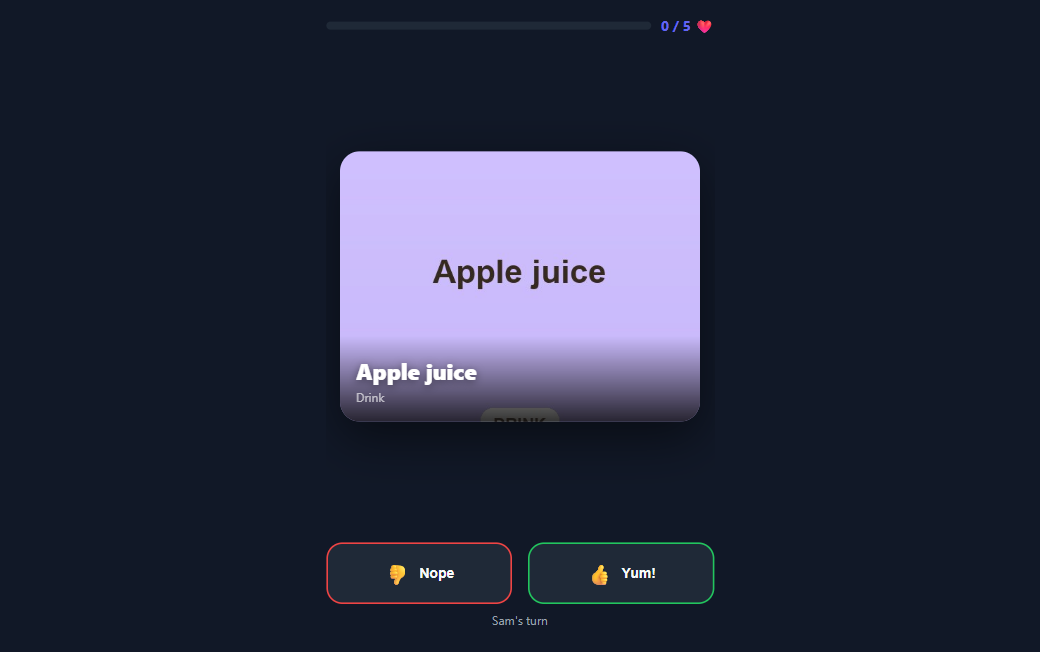
Code entry, then a full-screen card queue with a progress bar toward the goal, big touch targets, and a canvas confetti finish. No account, no login.
Catalog service
A Flask microservice that seeds a curated food list, fetches a photo for each, and asks an LLM for new kid foods when a child's unseen pool runs low.
02 Why I built it
This one is genuinely personal — a tool for my own kids. Getting a picky eater to commit to a dinner is a small daily negotiation, and a list of foods on paper gets an immediate "no." Making it a swipe game changes the framing: the child is choosing, one card at a time, and the session ends on a short list of things they said yes to. There was no formal spec — the motivation is the artifact itself and the homepage blurb, "Food Tinder for picky kids — swipe to find foods you love." It was a weekend-shaped build to make a recurring household problem a little more fun.
03 What I built & how it works
Two containers, two runtimes, one shared SQLite file — plus a self-hosted LLM gateway for the catalog.
Fig. 1 — the Node app runs the game and proxies catalog work to the Flask service; both read and write the same WAL-mode SQLite file on a shared volume, so either container is safe to start first.
- Set a goal — a parent creates a session for a child with a like-goal (default 5) and gets a 4-character room code to hand off.
- Join — the child opens the play page on any device and enters the code; access is gated only by that code — no accounts anywhere.
- Swipe — full-screen food cards, one at a time, tap Yum or Nope; the client prefetches a small queue and tops it up in the background so swiping stays instant.
- Complete — the server counts likes; at the goal it flips the session to complete and returns the liked foods, and the client lands on the confetti done screen.
- Refill — when a child's unseen-food pool drops below 50, the app fire-and-forgets a request to the catalog service, which asks the LLM for new kid foods and fetches an image for each.
04 🛠 Skills & tech used
05 Notable challenges & decisions
A toy on the surface; the interesting parts are the seams — concurrency, a pool that keeps itself stocked, and being honest about where it falls short.
Two runtimes, one SQLite file
The Node app and the Python service share a single WAL-mode SQLite file on a bind-mounted volume. Both own a copy of the schema and create the same 6 tables — the Node copy strict (CHECK constraints, a composite UNIQUE, FK indexes), the Python copy deliberately looser, with a comment noting the other container "may have already created them." It is intentional tolerance for either container starting first, at the cost of two divergent schema definitions.
A card pool that refills itself
A kid should never run out of cards or re-see a food. An anti-join query excludes every food the child has ever voted on — across sessions, not just this one. When the unseen pool drops below 50, the client fire-and-forgets an expand request; the catalog service asks the LLM for foods not already present, coerces the reply into clean JSON, and fetches an image through a three-tier fallback (Wikipedia → Unsplash → LLM image-gen) before adding them.
A security pass on build day
Several review-style fixes landed the same day: the session code is embedded via JSON.stringify to close an XSS hole, parseInt gained an explicit radix and the session id gained validation, image downloads under 1 KB are rejected so an error page can't masquerade as a photo, and every user-supplied count is clamped (goal 1–20, expand 1–100). Small app, but the boundaries got tightened.
Idempotence that locked in a partial result
In the personal deployment the image-API keys were never set, so acquisition fell through to the Wikipedia tier only and the seed completed with 50 of 284 foods. Because the idempotence check keys on job status rather than outcome, the other 234 were treated as done and never retried — the app has effectively run on 50 foods since day one, and every catalog-expand job added zero items. A real lesson: an idempotence check keyed on "did it finish" instead of "did it succeed" can freeze a partial state.
A home tool, scoped like one. There is no authentication anywhere — kid access is gated solely by the 4-character room code, and the app is LAN-only by design, not by security. Absolute paths and a hardcoded handoff URL also make it un-friendly to reverse-proxying. Those were fine trade-offs for something running on the house network for one family; they would all need work before any wider exposure.
06 Results
Sources: the shared SQLite database and git history (dossier, read 2026-07). It was a single-day build (2026-03-31) with no commits since. Note the honest caveat above: only 50 of the 284 foods acquired images in the live personal deployment, because the image-API keys were never set and an idempotent seed left the rest unretried.
07 Screenshot
De-identified demo data — the live database held real children's names, so anything shown here uses stand-in demo children and food photos.
08 Honest status
This was a single-day build in March 2026, made for my own kids, and untouched since — it did its small job and got left alone. A runnable two-service clone exists (the Node web app and the Python catalog sharing a data volume), seeded with de-identified food photos, so it can be brought up without touching the family's real data. The original deployment is only partially standing today: the catalog container lingered but the web container is gone, so a live demo needs a rebuild. Honest limitations carry over from the build: no authentication at all (LAN-only by design), only 50 of the 284 curated foods ever got images because the image-API keys weren't configured, and the LLM-expansion loop is effectively "shipped but barely exercised." It is a modest, personal utility — a picky-eater game for one household — not a hardened product.
Fussy Eater — Build Recipe
Take a bare machine to a running copy of Fussy Eater — a self-hosted kids' dinner-planner. A parent adds their children and starts a "session"; the child then swipes through a photo catalog of foods (thumbs up / down, Tinder-style) to discover what they'll actually eat, and the parent sees the results. It's a two-service app — a Node/Express web UI and a Python/Flask food-catalog builder — that share one SQLite DB + image store, with an optional LLM self-expanding catalog.
Status: ✅ Verified 2026-08-01 — built from this clean clone with a single
docker compose up --build. Both images build, both services come up healthy, the catalog is seeded on first run (50 real, de-identified foods) into the shared volume, and a browser walked the full parent→child flow key-free: added a child, started a session, and the swipe view rendered real food photos (seedemo.png). Both test suites pass — web 5/5 (Jest), catalog 6/6 (pytest) — fully offline. The clean clone lives inclone/. All three tiers are covered — prebuilt tarball (both images, ~462 MB, verified 2026-08-01), build-from-source, and bare-metal.Sensitive data — read this. This is a kids' app, so it's worth being explicit: no personal or family data is in the source at all. A fresh install creates zero children/sessions/votes (those tables are populated only at runtime, through the UI). The bundled demo catalog is a generic food list — no names, no preferences, no photos of anyone. There is no shipped runtime database. The one rule when reproducing: never copy a running
catalog.db(which would hold real kids' names and food ratings) — ship an empty volume, which this recipe does.
What it is
Two services sharing one volume (/app/data → catalog.db + images/):
- web (fussy-eater/, Node/Express, port 3000) — the parent + child UI. Owns the DB schema and
reads foods from the shared DB.
- catalog (fussy-eater-catalog/, Python/Flask, port 5000, internal) — seeds foods + photos into the
shared DB on first run, and can optionally self-expand the catalog via an LLM.
The only cross-service call is a one-way web → catalog /expand that fails gracefully. The app runs
fully without the catalog service reachable and without any LLM.
Prerequisites
New machine? Install the base tools first — see ../SETUP.md. Then, per tier:
| Tier | You need |
|---|---|
| 1 — prebuilt container (recommended) | Docker Desktop (see ../SETUP.md). Nothing else. |
| 2 — build from source | Docker Desktop (see ../SETUP.md). Nothing else. |
| 3 — bare-metal | Node 20 (web) and Python 3.11 (catalog). |
Configuration — everything is optional
The app runs with no configuration and no .env — docker compose up is enough. Everything below
is opt-in:
| Setting | Unlocks | Without it |
|---|---|---|
UNSPLASH_ACCESS_KEY |
Nicer food photos when Wikipedia misses | Wikipedia-only images (keyless) |
LLM (LITELLM_*, see below) |
The self-expanding catalog (/expand) |
The catalog stays as seeded |
PORT, PUBLIC_BASE_URL |
Remap the host port / set the LAN URL handed to the child | Sensible defaults |
Tier 1 — Run the prebuilt container(s) (recommended)
Availability: the prebuilt image bundle is available on request — it is not published or linked anywhere. Ask Kevin for it, or build everything from source via Tier 2/3 below.
Two images ship in one tarball — the web UI (clone-fussy-eater) and the food-catalog builder
(clone-fussy-eater-catalog).
# --- produce the tarball once, on a machine that has already built the images ---
docker save clone-fussy-eater clone-fussy-eater-catalog -o fussy-eater-images.tar   # ~462 MB

# --- consume it anywhere (no build needed) ---
docker load -i fussy-eater-images.tar     # loads BOTH images (web + catalog)
cd clone
docker compose up -d                       # → http://localhost:3000  (no --build; images already loaded)
curl http://localhost:3000/health          # → {"status":"ok"}
The whole tarball is ~462 MB (verified 2026-08-01). No keys, no .env — on first boot the catalog
seeds the bundled demo catalog into the shared volume, exactly as in Tier 2.
The optional LiteLLM proxy (--profile llm) is not in this tarball — its image
(ghcr.io/berriai/litellm:main-latest) is pulled/saved separately, only if you opt in.
Tier 2 — Build the image from source
cd clone
docker compose up -d --build          # → http://localhost:3000
No keys, no .env. On first boot the catalog service copies the bundled demo catalog (foods +
images) into the shared volume; the web app is then browsable. Open http://localhost:3000, add a
child, and start a session — the child's play screen shows the food cards to swipe.
Tier 3 — Bare-metal (two processes sharing a data dir)
cd clone
# catalog — Python 3.11
cd fussy-eater-catalog && python -m venv .venv && . .venv/bin/activate    # Windows: .venv\Scripts\activate
pip install -r requirements.txt
DB_PATH=../data/catalog.db IMAGE_DIR=../data/images python app.py          # :5000  (seeds on startup)

# web — Node 20 (separate shell, from clone/)
cd fussy-eater && npm install
DB_PATH=../data/catalog.db IMAGE_DIR=../data/images \
  CATALOG_SERVICE_URL=http://localhost:5000 node server.js                 # :3000
(Both must point DB_PATH/IMAGE_DIR at the same dir — that shared store is how they talk.)
Optional: the LLM self-expanding catalog
The catalog can invent brand-new kid-foods (and generate photos) via an LLM — off by default. It needs one OpenAI-compatible endpoint. Turnkey path = the bundled LiteLLM proxy:
# put OPENAI_API_KEY + LITELLM_* in .env, then:
docker compose --profile llm up -d --build
.env.example documents all three options (bundled LiteLLM / OpenAI-direct / local Ollama). The default
docker compose up never starts the proxy.
Verify
curl http://localhost:3000/health                 # → {"status":"ok"}
curl -s http://localhost:5000/status 2>/dev/null || \
  docker compose exec fussy-eater-catalog wget -qO- http://localhost:5000/status
# → {"food_count": 50, "seed_status": "complete", ...}
Then open the UI, add a child, start a session, and swipe — you should see the food catalog with images.
Run the tests (offline, zero keys):
cd fussy-eater && npm install && npm test                   # Jest + Supertest, in-memory DB
cd fussy-eater-catalog && pip install -r requirements.txt && python -m pytest    # Flask, mocked
Notes & gotchas
- Two services, one shared volume. Both mount the same
/app/data; the catalog writes foods + images, the web reads them. The composedepends_on: condition: service_healthymakes the web wait until the catalog has seeded, so the UI is never empty on first boot. - The bundled demo catalog ships ~50 real food photos, de-identified from the author's own running
instance — only the generic
foodsrows + their images were taken; thechildren/sessions/votestables were left behind. The app itself also fetches real Wikipedia photos (keyless) when it seeds/expands on a normal network — the fetcher follows redirects and falls back to a Wikipedia search, so descriptive names like "Apple slices with peanut butter" resolve to a real page. To rebuild the catalog from scratch: deletedata/, ensure outbound internet, and restart (orPOST /expandwith an LLM on). - Catalog port 5000 is internal-only — only the web app (3000) is published; the catalog is reached
over the compose network at
http://fussy-eater-catalog:5000. - The play hand-off URL is dynamic — derived from the request host (or
PUBLIC_BASE_URL), so the "have your child go to …" link is correct on any machine/LAN. - The catalog runs Flask's dev server (fine for a personal LAN app; swap for gunicorn for anything public — out of scope for this recipe).
Provenance — data / model (no training, no GPU)
Fussy Eater trains nothing — no datasets, no GPU. The bundled demo catalog is ~50 generic kid-foods
with real food photos, de-identified from the author's own running instance (the generic foods
rows + images only — no personal children/sessions/votes data). The photos were sourced by the app
from Wikipedia (keyless) and are food images, not images of any person. The optional self-expanding
catalog calls a user-supplied LLM; no model weights ship.
What was stripped from the personal version (de-identification + recipe minimalism)
- All personal data — never present in source; a fresh install seeds zero children/preferences. The
live runtime
catalog.db(real kids' names + food votes) is never copied. - The home-server stack coupling — the two services lived in a ~645-line multi-service
compose/apps.ymlwired to an externalhomeservernetwork, a/mnt/docker-storagehost mount, and a shared LiteLLM gateway (with a hardcoded master key). Replaced with a standalonedocker-compose.yml(one shared named volume, bridge network) + an opt-in--profile llm. - A hardcoded internal home-server URL (shape:
http://<home-server>:8233/play) in a view → made dynamic (request host /PUBLIC_BASE_URL). - The hard LiteLLM coupling — the catalog now depends only on "an OpenAI-compatible endpoint," off by
default, with the hardcoded model aliases (
free-chat/paid-image) made configurable. - Author infrastructure docs (the home server's facts file,
litellm_config.yaml,litellm_callbacks.py, the server-wide compose files, Caddy/homepage config) → not copied.