01 Overview
O.D.D. Companion is a self-hosted organizer for a parent or caregiver supporting a child with Oppositional Defiant Disorder (ODD). It gathers the day-to-day work of that care — behavior tracking, escalation logging, documents, notes, appointments, and contacts — into one mobile-first app, with a single search that reaches across every module. The design goal was modest and specific: make logging a hard day take under five minutes, and turn scattered records into the kind of longitudinal picture a clinician can actually read.
The clearest example of that intent is the escalation log's paired what helped and what didn't help fields. Those are the highest-value entries for spotting patterns across visits, and the reason the exports are formatted as plain, clinician-ready artifacts rather than a private diary.
Capture
A daily behavior tracker (8 metrics, rated 1–5, with trends) and a severity-coded escalation log built around the paired "what helped / what didn't help" fields.
Organize
A 10-category document cabinet with full-text search, rich notes (voice, image, and clipboard capture), an appointments calendar, and categorized contacts.
Surface
One global search across every module, plus server-compiled, clinician-formatted PDF or Word reports assembled from the whole record.
02 Why I built it
Care like this generates a steady stream of small records — a rating here, an incident there, a document from a visit, a phone number — and they tend to scatter across notes apps, photos, and email until the moment you need them in front of a clinician. I wanted one quiet place to hold all of it, designed so that logging in the middle of a difficult moment is fast enough to actually happen, and so that the accumulated detail reads as a pattern rather than a pile. The consistent thread through the interface copy is that the daily log builds a longitudinal record, and that "what helped and what didn't" is the field a clinician can do the most with.
03 What I built & how it works
It began as a single-file browser app and became a self-hosted, offline-capable one.
The first generation was a roughly 3,600-line single-file React app built inside a Claude.ai artifact, persisting through the sandbox's key-value store. The second ported it to my home server: a Vite React progressive web app with an IndexedDB cache in front of a small FastAPI + SQLite service, so any device on the home network stays in sync and the app keeps working offline. Because all storage had been funneled through two functions from the start, the port left every module component untouched and swapped only the persistence layer underneath.
Fig. 1 — the server stays schema-agnostic (opaque JSON per key); the client owns the shapes. Reports and attachment-text extraction run server-side; two backup tiers keep 30 days each.
- Capture — log the day's behaviors, an escalation, a note, or a document in a few taps; the target is under five minutes on a phone.
- Store — each module writes an opaque-JSON blob to a local IndexedDB cache and marks it dirty.
- Sync — dirty keys flush to the server on a 250 ms debounce; a 60 s poll and a boot pull keep two devices in step, last-write-wins.
- Search — attachment text is extracted server-side, so one query reaches across every module, including inside files.
- Export — the server compiles a clinician-formatted PDF or Word report from the whole record, module by module.
04 🛠 Skills & tech used
No machine-learning models run in the product itself. Its AI angle is the build: it was authored with Claude, then migrated from a browser artifact into a production self-hosted app.
05 Notable challenges & decisions
Most of the real work was making a browser-sandbox app survive on real machines and real browsers.
From an artifact sandbox to real machines
Everything persisted through a Claude.ai-only key-value API, so the app would silently fail to save anywhere else. Because all reads and writes had been centralized in two functions from the start, the port became a two-function swap and the module components didn't change. The move did surface a latent bug the sandbox had tolerated — a component used under an aliased import that never crashed in the artifact but did under a real Vite build.
Stopping the app from echoing itself
The first deploy produced a write storm: state pulled from the server re-triggered each module's save effect and got written straight back as new local changes. A single guard flag, set while remote data is being applied, gates those effects so a fresh load doesn't fan out into a round-trip per module.
Deciding which side wins, and when
Earlier buggy sessions had left keys marked dirty locally that could overwrite fresh server data on the next boot. The resolving rule is deliberately asymmetric: the boot pull is server-authoritative, so stale local edits can't clobber good remote data, while in-session polls still defer to unsaved local changes. Server-stamped timestamps keep ordering correct even when a device's clock is off.
PDFs that refuse to render
Chrome and Firefox both decline to show a PDF served as a data: URL inside an iframe, for security reasons. The inline attachment viewer converts to same-origin blob URLs instead, which render — a small fix that came from reading the actual browser behavior rather than assuming a data URL "should" work.
Deliberately small. No login, no HTTPS, no multi-child support, and no conflict-resolution UI — the app trusts the home network and assumes a single user, where sync conflicts are rare and benign. It also starts fresh: none of the artifact-era data was migrated. Taking it off-LAN would mean adding HTTPS and a shared secret, which the design notes but I have not built.
06 Results
Sources: the project repository, its CLAUDE.md brief, and the design spec / implementation plan.
07 Screenshot
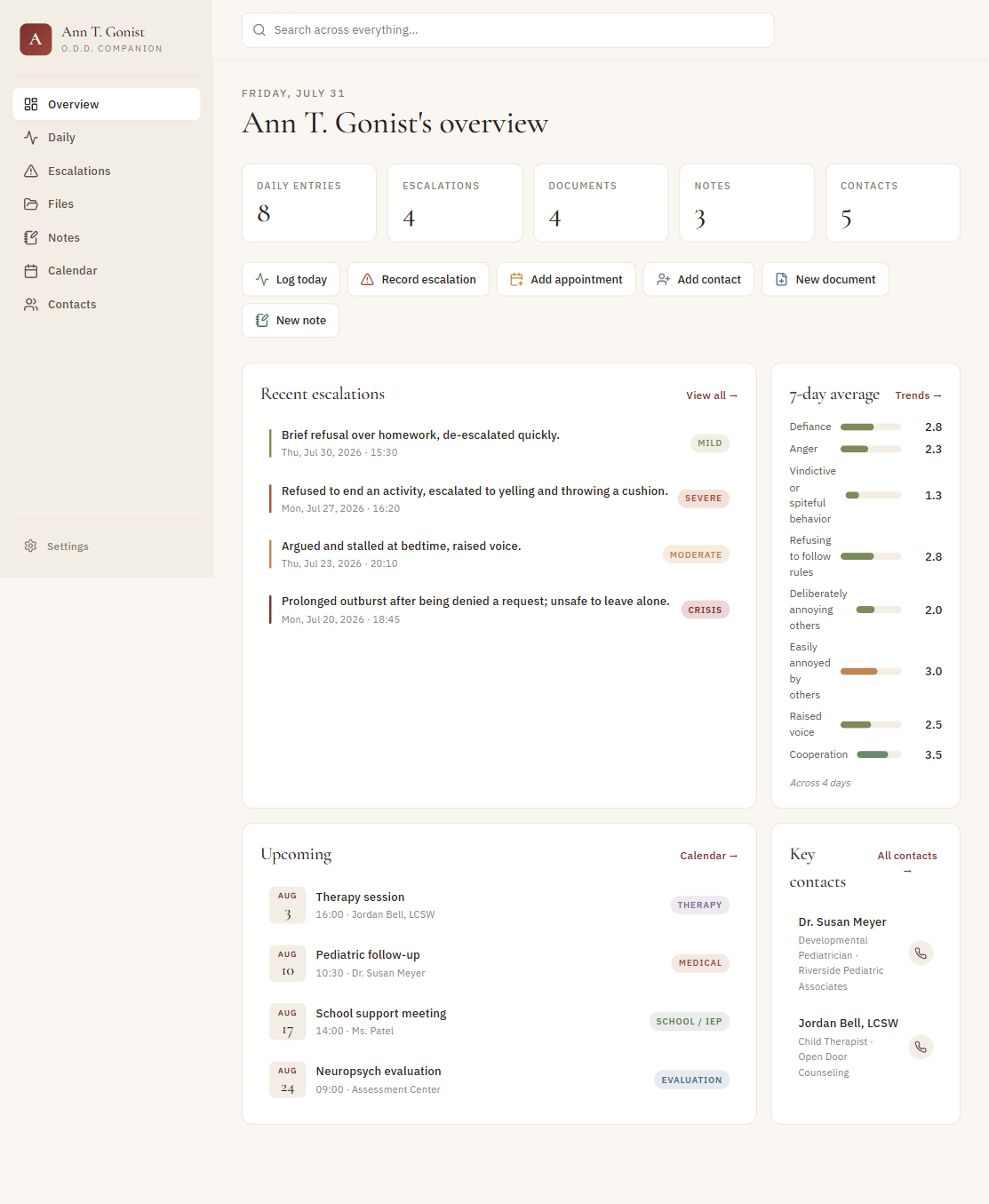
Shown with a de-identified clone — every name and record in it is synthetic.
08 Honest status
O.D.D. Companion is a private, single-user tool in real use, not a product. It runs on the home LAN with no login and no HTTPS — a deliberate home-trust scope, not production-grade security; taking it off-network would need HTTPS and a shared secret, which the design notes but I have not built. iOS install-and-offline behavior over plain HTTP was flagged as the one likely rough edge and is best resolved by that same HTTPS step. The screenshot above comes from a separate de-identified clone whose data is entirely synthetic — no real records are shown here or shipped. Because the underlying context is a family's private health information, I have kept this page deliberately general about the person it supports.
O.D.D. Companion — Build Recipe
Take a bare machine to a running copy of O.D.D. Companion — an offline-first companion app a caregiver uses to track a child's behavior over time: a daily behavior tracker (eight rated dimensions with trend averages), an escalation log (severity, triggers, what helped), a file cabinet, a calendar, a contacts book, and notes — all in one place, installable as a PWA and usable with no network. React 18 (Vite PWA) front end + a small FastAPI / SQLite back end that stores everything as opaque JSON and serves the built SPA.
Status: ✅ Verified 2026-07-31 — built from this clean clone on a laptop with a single
docker compose up --build. The image builds (multi-stage: Node builds the front end → Python serves it), the container comes up healthy,seed_demo.pyloaded the synthetic demo, and a real browser athttp://localhost:8260rendered the full dashboard — brand mark, "Ann T. Gonist's overview", the correct module counts (8 daily / 4 escalations / 4 documents / 3 notes / 5 contacts), recent escalations with severities, the computed 7-day averages, upcoming appointments, and key contacts — with 0 console errors. The 12-test backend suite passes in the shipped runtime. Seedemo-dashboard.pngfor the rendered result. The clean clone lives inclone/. All three tiers are covered — prebuilt container, build-from-source, and bare-metal; the prebuilt image tarball is ~279 MB (verified 2026-08-01).Sensitive data — read this. The real app holds a real child's behavioral-health records. None of that is here. The clone ships zero data (no SQLite DB, no backups, no exported reports); the demo you see is entirely fictional — "Ann T. Gonist" (say it aloud), the providers, the school, and every phone number are invented by
seed_demo.py. The app is a personal, single-caregiver tool with no authentication and no encryption at rest — it is not a HIPAA-compliant system. Run it for yourself, on your own machine or a private network.
What it is
Two pieces:
- Front end — a React 18 single-page app built by Vite into a PWA (installable, offline via a
service worker). State lives in IndexedDB first, so the app works with no network; a small sync
engine (
sync.js) pushes local writes to the back end and, on boot, pulls the server's copy so a fresh device/browser hydrates from the server. - Back end — a FastAPI app over SQLite exposing a tiny key-value API
(
GET/PUT/DELETE /api/store/{key}, plus/api/store/since/{ts}for incremental sync), a text extractor, a PDF/DOCX report exporter, and a static-file mount that serves the built SPA. It stores each of the app's seven records as opaque JSON — it never parses the domain model, which keeps the server trivial and the data format entirely owned by the front end.
There is no training and no dataset — it's an application, not a model. "Reproducing" it is building the front end and running the server.
Prerequisites
New machine? Install the base tools first — see ../SETUP.md. Then, per tier:
| Tier | You need |
|---|---|
| 1 — prebuilt container (recommended) | Docker (see ../SETUP.md). Nothing to build — load the tarball (or pull the image) and run. |
| 2 — build from source | Docker (see ../SETUP.md). Nothing else — the image builds the front end itself. |
| 3 — bare-metal | Node 20+ (to build the front end) and Python 3.11+ (to run the server). |
The prebuilt tarball and the from-source build reproduce the same single artifact by different routes — Tier 1 loads an image someone already built; Tier 2 builds that image in one command.
Tier 1 — Run the prebuilt container(s) (recommended)
Availability: the prebuilt image bundle is available on request — it is not published or linked anywhere. Ask Kevin for it, or build everything from source via Tier 2/3 below.
Skip the build entirely: load an image someone already built and start it. There's a single image,
clone-odd-companion (the multi-stage build bakes in the Vite SPA and the FastAPI server).
# --- Produce the tarball once, on a machine that has built the image (see Tier 2): ---
docker save clone-odd-companion -o odd-companion-image.tar   # ~279 MB

# --- Consume it anywhere Docker runs (no build needed): ---
docker load -i odd-companion-image.tar          # loads clone-odd-companion
cd clone
docker compose up -d                            # no --build — the image is already loaded
# → http://localhost:8260
curl http://localhost:8260/api/health           # → {"ok":true}
python seed_demo.py                             # load the fictional "Ann T. Gonist" demo (optional)
Open http://localhost:8260 — an empty app on first run, or the demo if you seeded it. The SQLite
DB persists in ./data/ (git-ignored); delete it to start clean.
The tarball is ~279 MB (verified 2026-08-01) and holds just the
one clone-odd-companion image — there are no opt-in profiles or extra images to bundle separately.
Tier 2 — Build the image from source
cd clone
docker compose up -d --build      # stage 1 builds the SPA, stage 2 serves it
# → http://localhost:8260
curl http://localhost:8260/api/health          # → {"ok":true}
python seed_demo.py                             # load the fictional "Ann T. Gonist" demo (optional)
Open http://localhost:8260 — an empty app on first run, or the demo if you seeded it. The SQLite
DB persists in ./data/ (git-ignored); delete it to start clean.
Tier 3 — Bare-metal (no Docker)
cd clone

# 1) build the front end  (outputs frontend/dist)
cd frontend
npm ci
npm run build

# 2) put the build where the server serves it, then run the server
cd ../backend
#   copy the built SPA into src/static  (any copy works; e.g.)
#   Windows PowerShell:  Copy-Item -Recurse ..\frontend\dist\* src\static\
#   bash:                mkdir -p src/static && cp -r ../frontend/dist/* src/static/
python -m venv .venv && . .venv/bin/activate    # Windows: .venv\Scripts\activate
pip install -r requirements.txt
uvicorn src.main:app --host 0.0.0.0 --port 8260
Then seed if you like: python ../seed_demo.py http://localhost:8260.
(The server also runs fine with an empty src/static — the API works and the SPA fallback just
returns a "frontend bundle not built" 404 until you build it. The DB path is configurable via the
ODD_DB_PATH env var; it defaults to ./odd.db bare-metal, /data/odd.db in the container.)
Verify
curl http://localhost:8260/api/health
# → {"ok":true}

# after seeding, the server returns all seven records:
curl -s http://localhost:8260/api/store | python -m json.tool | head
# → {"odd-app:profile": {"value": {"childName": "Ann T. Gonist"}, "updated_at": ...}, ...}
Then open the page — the dashboard should show the child's name, the module counts, recent escalations, the 7-day behavior averages, upcoming appointments, and key contacts.
Run the backend tests. They exercise the DB layer and the store API (12 tests). Easiest in the shipped runtime (has everything installed):
docker compose cp ../backend/tests odd-companion:/app/tests    # or: docker cp
docker compose exec odd-companion sh -c "pip install -q pytest httpx && cd /app && python -m pytest tests -q"
# → 12 passed
Bare-metal equivalent (Python 3.11+): from backend/, pip install pytest httpx then pytest -q.
Notes & gotchas
- The server is the source of truth at boot; the browser is offline-first after that. A fresh
browser (empty IndexedDB) pulls
GET /api/storeon load and renders it — which is exactly why seeding the server is enough to populate the UI. In-session, local edits go to IndexedDB immediately and flush to the server in the background. - PDF export needs WeasyPrint's native libs. They're in the Docker image; on bare-metal Windows
they usually aren't. WeasyPrint is lazy-imported inside the export path, so this never affects
startup, the API, the UI, or DOCX export (pure-Python) — only
POST /api/exportwithformat=pdfwould fail there. - No auth, no multi-tenant. One app = one child's records. Point different
ODD_DB_PATHvalues (or different containers/ports) at different databases if you need more than one. data/and*.dbare git-ignored. The clone intentionally carries no database; that's the whole point — you bring your own data (or the synthetic seed).- Front-end bundle: Vite emits ~250 kB JS (~72 kB gzipped) + ~32 kB CSS and a 10-entry PWA precache — small enough to install and run fully offline.
Provenance (no training data, no GPU, no model)
O.D.D. Companion trains nothing and calls no external service — there are no datasets, no model weights, and no GPU anywhere in the build. It is a self-contained local application; the only network traffic is between the browser and its own back end on the same origin.
What was stripped from the personal version (de-identification + recipe minimalism)
- All real data — the live SQLite database, the
backups/*.dbsnapshots, and any exportedsample-report.pdf(which could carry the child's real name) → excluded entirely. The clone ships no data; the demo is synthetic (seed_demo.py). - The child's initial in the brand mark — the sidebar glyph and the generated PWA icons showed the real child's first initial → changed to a neutral "A", and the icons were regenerated. The rest of the UI already reads the child's name from the (now-synthetic) profile record, so nothing else was hardcoded.
- Server-specific deploy tooling —
deploy.sh, thescripts/bootstrap,CLAUDE.md, and thedocs/folder (all describing the author's private home-server host) → removed. The clone adds a clean, self-containedDockerfile+docker-compose.ymlinstead. - A backup-to-server UI string that named the author's host → genericized.
- Git history (
.git) and build artifacts (node_modules,dist,src/static) → excluded; the image rebuilds them from source.