⚙ How it works 🌐 Remote flavor ⬇ Downloads 🖼 Screenshots
01 Overview
PhotoDrop is a small utility that solves an everyday clinic annoyance: getting a good intraoral or clinical photo off a cell phone and onto the operatory computer's imaging system without cables, an email round-trip, or a cloud account. Run one Python file on the PC — it starts a local web server and opens a dashboard showing a QR code. Scan it from a phone on the same WiFi, tap-select photos, and they upload straight into a folder the imaging software watches. It also doubles as the intake front door for the SmileVision and dental-narrative apps.
The whole thing is a single Python file: the entire responsive web UI — both desktop and mobile modes — is embedded as one string in the source and renders with no internet, its one small dependency (segno) generating the pairing QR locally instead of calling a web service. A per-session access token rides inside that QR, so only a device that scanned this screen can reach the gallery or upload.
Since August 2026 it comes in two flavors, each a single Python file. Flavor: LAN is the original — everything happens on the clinic network and photos never leave the room. Flavor: Remote covers the case where the phone is somewhere else entirely: the same QR-scan flow, but the photo crosses the internet end-to-end encrypted through a small relay that only ever stores ciphertext.
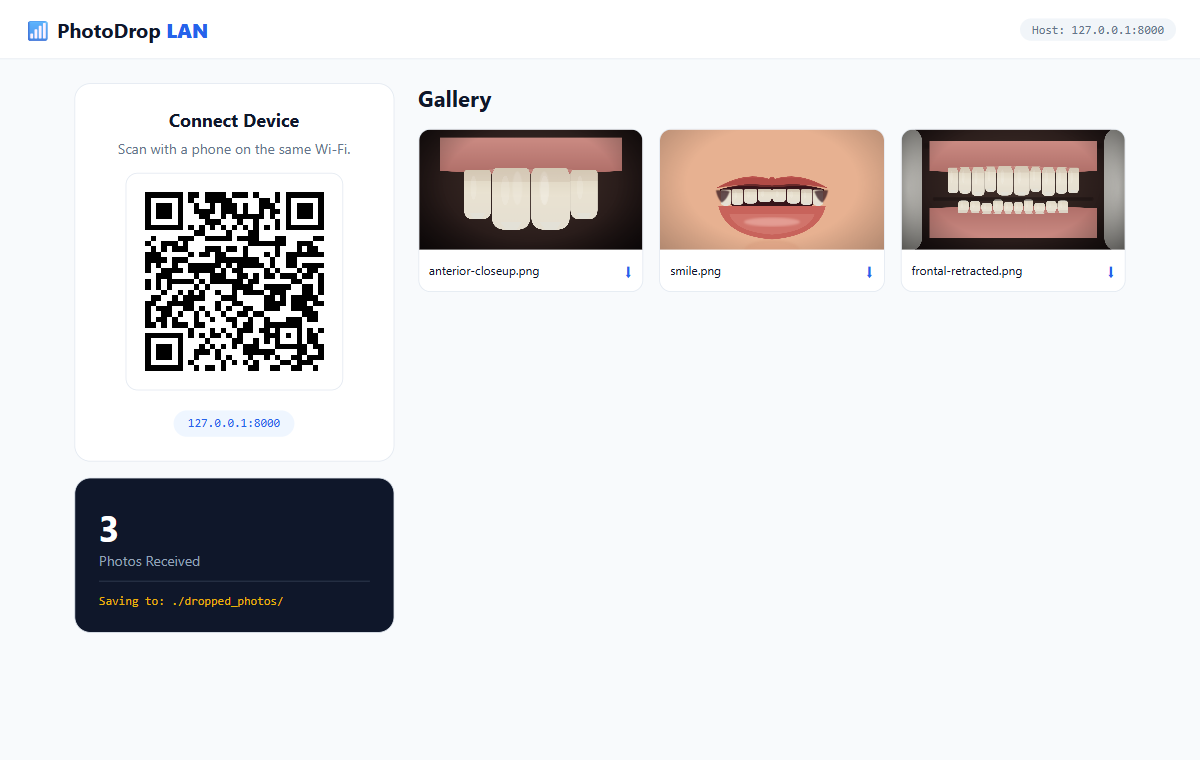
Desktop dashboard
A QR pairing card, a photos-received counter with the save path, and a live gallery that re-renders as new photos arrive.
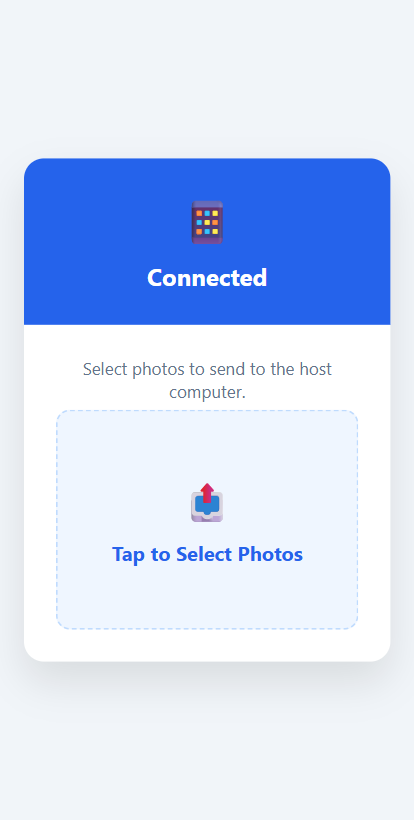
Mobile uploader
The same page in its mobile branch: a tap-to-select dropzone, multi-file upload with per-file progress, and a "sent N photos" confirmation.
02 Why I built it
In practice, the phone is often the best camera in the room — but there's no friction-free way to move a photo from it onto the operatory PC's imaging system. Cables get lost, email adds a cloud hop and a compression step, and installed transfer apps are one more thing to manage on shared clinic hardware. I wanted the shortest possible path: point the phone at a QR on the screen, pick the photos, and have them appear in a folder the X-ray software can already import. Keeping it a single self-contained file was part of the point — it should be close to double-click-and-go on any clinic machine, work with no internet, and the images should never leave the local network.
03 Flavor: LAN — what I built & how it works
One process, one file: an HTTP server on the PC and a single page that renders two different UIs — one per device.
Fig. 1 — the desktop and mobile experiences are the same page, which reads a ?mode= query parameter to render the right UI on each device. The upload sends the raw file body with the name in the query string, sidestepping multipart parsing.
- Start — run the single file; it autodetects the LAN IP (a connectionless UDP-route trick, no traffic sent), binds the server, and auto-opens the desktop dashboard with a QR of its own URL.
- Pair — scan the QR on the clinic screen; the phone loads the same page's mobile branch on the same LAN.
- Select — tap-pick one or more photos; each POSTs its raw bytes with the filename in the query string.
- Land — the PC writes them into
dropped_photos/, sanitizing the name and suffixing a timestamp on collisions. - Import — the desktop gallery re-renders within about two seconds, and the imaging software picks the files up from the folder.
04 🛠 Skills & tech used
05 Notable challenges & decisions
Raw bytes instead of multipart
The stdlib http.server has no multipart parser, so rather than pull one in, the client POSTs the raw file body with the filename in the query string. The server writes the bytes straight to disk after an os.path.basename sanitize and a timestamp suffix on name collisions — a deliberately small protocol that kept file handling on the standard library.
Three templating syntaxes in one string
The whole UI lives as one embedded string, which is convenient until placeholders collide. The one recorded bugfix: a ${UPLOAD_DIR} token looked like a JavaScript template literal but sat inside a Python string served verbatim, so it rendered literally. The fix was a {{UPLOAD_DIR}} placeholder injected server-side with .replace() — a reminder that Python, JS, and mustache-style tokens all coexist inside that one string.
A single blocking server, on purpose
It uses one blocking TCP server with no threading — fine for a single uploader on a LAN, where large simultaneous uploads would simply serialize. Keeping it single-threaded kept the whole tool readable in one file.
Hardened for clinical use. The first pass leaned on the open internet — it pulled its UI (CSS, icons, a font) and even the pairing QR from third-party CDNs, and ran over plain HTTP with no authentication, so anyone on the network could upload or browse the received folder. Fine for a personal utility, not for anything near patient data. The shipped version closes all of that: the UI is inlined and the QR is generated locally, so it makes no third-party calls and works with no internet; a per-session access token gates every page and data request; and a built-in --https mode serves it over TLS. Same tool and the same flow — just self-contained and access-controlled.
06 Results
Sources: the two single-file scripts (line counts measured with wc -l) and the on-disk dropped_photos/ folder.
07 Flavor: Remote — an end-to-end-encrypted relay
The Remote flavor covers the case the LAN flavor deliberately ignores: the phone is not in the building. The desktop script asks a small Cloudflare Worker for a session, generates a fresh AES-256 key locally, and shows a QR whose URL carries the key in its fragment — a part of the URL browsers never transmit to any server. The phone's browser encrypts each photo (and its filename — names can be identifying) before anything leaves the device; the desktop polls the relay, decrypts, saves to the same dropped_photos/ folder, and deletes the blob. Try it yourself via the Live Demo link above — it opens a hosted page where you can scan the QR with your own phone.
Fig. 2 — the Remote flavor's path. The relay never holds a key or a readable byte: encryption happens on the phone, decryption on the clinic PC, and the key rides only in the QR's URL fragment.
Honest caveat. The relay is a small Worker I operate on Cloudflare. Ciphertext-only means a relay compromise yields unreadable bytes and salted token hashes — but it does not make this an audited clinical product: Cloudflare still sees traffic metadata (IPs, timing, sizes), there is no BAA, and availability depends on one hobby-scale service. Delete-on-pickup plus a 24-hour sweep keeps steady-state storage near zero, and photographing the QR would let a stranger inject photos but never read any — the pickup credential never leaves the clinic PC.
08 Downloads
Both flavors are single Python files — download, pip install one or two small packages, run. Neither file contains a secret: the relay URL is public by design and every session credential is generated fresh at runtime.
photodrop_secure.py
Offline, token-gated, optional self-signed TLS. Needs pip install segno.
photodrop_remote.py
End-to-end encrypted via the relay; --relay points it at your own. Needs pip install segno cryptography.
09 Screenshots
These captures are from the LAN flavor: open it on the clinic PC, scan the QR with a phone on the same Wi-Fi, and the photos you pick land in the desktop gallery within about two seconds. The captures below are from the shipped, self-contained version — the desktop dashboard just after a few clinical photos have arrived, and the phone's uploader.
10 Honest status
PhotoDrop was built with an LLM in January 2026 and verified working end to end — the server starts, serves the desktop and mobile pages, requires the access token on every page and data request, and accepts, lists, and serves an upload back. It is a single-file personal utility, not a deployed product: no git history, and it has only been exercised on a couple of machines. The offline UI, locally-generated QR, per-session access token, and optional self-signed TLS cover the basics for a trusted operatory LAN — but the TLS is self-signed rather than CA-trusted, so a fully warning-free, audited clinical deployment would still want a proper certificate and a security review. As it stands, it does one small thing well: getting phone photos onto the operatory PC with as little friction as possible, without them ever leaving the local network. The Remote flavor (added August 2026) keeps that scope honest too: it depends on a small relay Worker that I operate — if the relay is down, the remote QR flow simply does not start, and the LAN flavor is unaffected.
PhotoDrop — Run Guide
A zero-cable LAN photo-transfer tool. Run it on the computer you want photos on; it shows a QR code; a phone on the same Wi-Fi scans it and taps to upload photos, which land in a local folder and appear in a live desktop gallery. It is self-contained and access-controlled: the interface is inlined (no CDN), the QR is generated locally, and a per-session token gates every page and data request.
There are two flavors, each a single file: photodrop_secure.py (LAN — the sections below) and
photodrop_remote.py (see The Remote flavor further down), which does the same job when the phone
is not on the clinic Wi-Fi by crossing the internet end-to-end encrypted.
Clinical use case: capture high-quality intraoral/clinical photos on a phone and get them onto the operatory computer's imaging folder with no cables, no email, no app — the photos land in a local directory the imaging software can import. In the LAN flavor nothing leaves the local network; in the Remote flavor (below) photos cross the internet end-to-end encrypted — the relay in the middle only ever stores ciphertext and salted token hashes, so nothing readable exists outside the phone and the PC.
Status: ✅ Verified — the whole server-side flow was exercised end-to-end: the server starts, serves the desktop and mobile pages, refuses page and data requests without the access token (403), accepts a raw-binary upload (
POST /api/upload→Success), lists it (/api/list), and serves the image back (HTTP 200) — with a locally-generated QR and zero CDN refs confirmed. The one part that can't be automated is the physical phone QR-scan — that's a manual check.Sensitive data: none. No secrets, no accounts, no config. Uploaded photos land in a local
./dropped_photos/next to the script.Remote flavor: ✅ verified end-to-end against the deployed relay — a scripted phone (WebCrypto in Node) encrypted and uploaded a photo, the real desktop script decrypted a byte-identical file into
./dropped_photos/, and the blob was deleted from the relay. Also verified from a real phone on cellular (2026-08-08): scanned the QR, sent a photo, it arrived decrypted — no shared network involved.
What it is
The LAN flavor is a single ~330-line Python file (photodrop_secure.py) — Python standard library plus one small
pure-Python dependency, segno, used to generate the pairing QR locally. The entire responsive web
UI (desktop + mobile) is embedded as a string, with hand-written CSS and emoji icons, so it renders
with no internet. It auto-detects the machine's LAN IP, serves on port 8000, and opens the
desktop view in your browser. Every request carries a per-session access token (it rides inside the
QR); a request without it gets a 403.
Prerequisites
Python 3.8+ and one small package:
pip install segno
(New machine? Install Python per ../SETUP.md.) No virtualenv or Docker needed.
Run it — this is the whole recipe
python photodrop_secure.py # add --https for TLS (see Encryption below)
It prints the Desktop URL (which carries the access token), opens your browser to it, and shows a
QR code. On your phone (same Wi-Fi): scan the QR → Tap to Select Photos → they upload and appear in
the desktop gallery, saved to ./dropped_photos/. Ctrl-C to stop.
- Pin a fixed token instead of a random per-session one:
PHOTODROP_TOKEN=some-token python photodrop_secure.py. - Change the port with
--port 9000; change the save folder by editingUPLOAD_DIRat the top of the file.
Why there's no prebuilt-image / Docker tier
Deliberately omitted — it would add friction for zero benefit ("if it isn't needed, don't include
it"). PhotoDrop must present the host's LAN IP and be reachable from phones on the LAN, so a
container would need host networking and still gain nothing over python photodrop_secure.py. One
file, one command is the distribution.
Verify
pip install segno
PHOTODROP_TOKEN=testtok python photodrop_secure.py &                        # start it; token pinned for this check
curl -s "http://localhost:8000/?token=testtok" | grep PhotoDrop             # desktop page
curl -s "http://localhost:8000/?mode=mobile&token=testtok" | grep "Tap to"  # mobile upload page
curl -s -o /dev/null -w '%{http_code}\n' http://localhost:8000/             # → 403 (no token = denied)
curl -s -X POST "http://localhost:8000/api/upload?name=t.png&token=testtok" --data-binary @some.png   # → Success
curl -s "http://localhost:8000/api/list?token=testtok"                      # → the file appears
Then the real acceptance test: open the desktop page, scan the QR with a phone, and upload a photo.
Encryption — --https (built in)
The token blocks other devices, but plain HTTP means someone sniffing the same Wi-Fi could still capture the token/photos. There is a built-in self-signed TLS mode:
pip install cryptography              # (or just have `openssl` on PATH) — used to generate the cert
python photodrop_secure.py --https    # auto-creates cert.pem/key.pem, serves over https://
On first run it generates a self-signed cert for your LAN IP (reused afterward), wraps the socket with
stdlib ssl, and the QR switches to https://. Real encryption — the one cost is a one-time
"not private" warning on the phone (self-signed isn't CA-trusted); tap through. Bring your own cert
with --cert / --key.
Warning-free alternative: use mkcert / your own CA to issue a cert for the LAN IP and install the
CA root on each device once — green-lock HTTPS, no warnings, but per-device setup. A public CA
(Let's Encrypt) is impractical for a bare LAN IP (needs a public domain name).
The Remote flavor — photodrop_remote.py
Same tool, second single-file script, for when the phone is not on the clinic network. The desktop
script asks a tiny Cloudflare Worker (the "relay") for a session, generates a fresh AES-256-GCM key
locally, and shows a QR whose URL carries the key in its fragment (browsers never transmit
fragments to any server). The phone's browser encrypts each photo and its filename with WebCrypto
before upload; the desktop polls the relay every ~2 s, decrypts, saves to the same ./dropped_photos/,
and deletes the blob. The relay stores ciphertext and salted token hashes only — it cannot read a
byte. Deps: segno + cryptography; HTTP via the standard library.
Run it
pip install segno cryptography
python photodrop_remote.py                 # uses the public default relay
It prints the desktop URL (token-gated and bound to 127.0.0.1 — the phone never connects to your PC),
opens the browser, and shows the QR. Scan from the phone on any network → photos appear in the
desktop gallery and land in ./dropped_photos/. --port 9000 to change the local port.
Self-host your own relay
The default relay is a public convenience, not a requirement. The full Worker source ships in
remote/relay/; deploying your own needs a free Cloudflare account and a few minutes. Brand-new
accounts must also enable R2 once in the dashboard first (R2 → Get started → accept terms; still
free tier) or wrangler r2 bucket create fails with error code 10042.
cd remote/relay
npm install                                          # dev dependency: wrangler
npx wrangler login                                   # opens the browser to authorize
npx wrangler r2 bucket create photodrop-relay        # the bucket wrangler.jsonc binds
npx wrangler deploy                                  # prints https://photodrop-relay.<your-subdomain>.workers.dev
python ../photodrop_remote.py --relay https://photodrop-relay.<your-subdomain>.workers.dev
No other configuration: the Worker holds no secrets (session tokens are generated at runtime and stored
only as salted hashes), and the cron trigger in wrangler.jsonc purges leftover blobs and sessions.
Verify
pip install segno cryptography
PHOTODROP_TOKEN=testtok python photodrop_remote.py &                                 # token pinned for this check
curl -s "http://127.0.0.1:8000/?token=testtok" | grep -o "PhotoDrop <b>Remote</b>"   # desktop page
curl -s -o /dev/null -w '%{http_code}\n' http://127.0.0.1:8000/                      # → 403 (no token = denied)
Then the real acceptance test: scan the QR with a phone on cellular (proves "any network" by
construction) and send a photo — it appears in the gallery, lands in ./dropped_photos/, and the blob
is deleted from the relay.
Remote-flavor caveats
- You are trusting the relay for availability, not confidentiality. If it is down, the QR flow doesn't start; nothing readable is ever on it. Traffic metadata (IPs, timing, sizes) is still visible to the relay host — there is no BAA; this is a personal tool, not an audited product.
- Photographing the QR lets a stranger inject photos into the session (the same exposure as the LAN flavor) but never read any — the pickup credential never leaves the PC.
- Unclaimed blobs are swept after 24 h; dead sessions after 7 days. Restarting the script = new session, new QR.
Caveats & clinical notes
- Plain HTTP unless you pass
--https. The access token stops other devices on the Wi-Fi from viewing or uploading, but without TLS a determined sniffer on the same network could still capture traffic. Use--httpsfor anything sensitive. - Self-signed TLS is real encryption but not CA-trusted — expect a one-time "not private" warning on the phone (or install your own CA root; see above).
- Single-machine, single-uploader scope. One blocking server; it's a personal utility, not an audited product.
- Port 8000 must be free (
--portto change).
Earlier version
The repo also keeps photodrop.py — the original quick pass. Same tool, same flow, but it loaded its UI
(Tailwind, icons, a font) and the QR image from CDNs (so it needed internet and sent the LAN URL to a
third party) and ran open over HTTP with no token. photodrop_secure.py supersedes it; run the
secure one — photodrop.py is kept only for reference.
Provenance
No datasets, no model, no training, no external accounts, no secrets — a self-contained stdlib script
plus one small pure-python dependency (segno, for the offline QR). Built with an LLM, Jan 2026.