⚙ How it works 📊 Results 🖼 Screenshots
01 Overview
Writing a clinical note is not a thinking problem — the clinician already knows what happened. It is a typing problem: the same eight paragraphs again, with today's tooth number, today's shade, and today's carpule count dropped into the right places, worded consistently enough that the note still reads clearly when someone pulls the chart two years later. Smart Note asks for the parts that change and writes the parts that do not, then hands over a finished note to paste into the practice management software.
Stepped questions
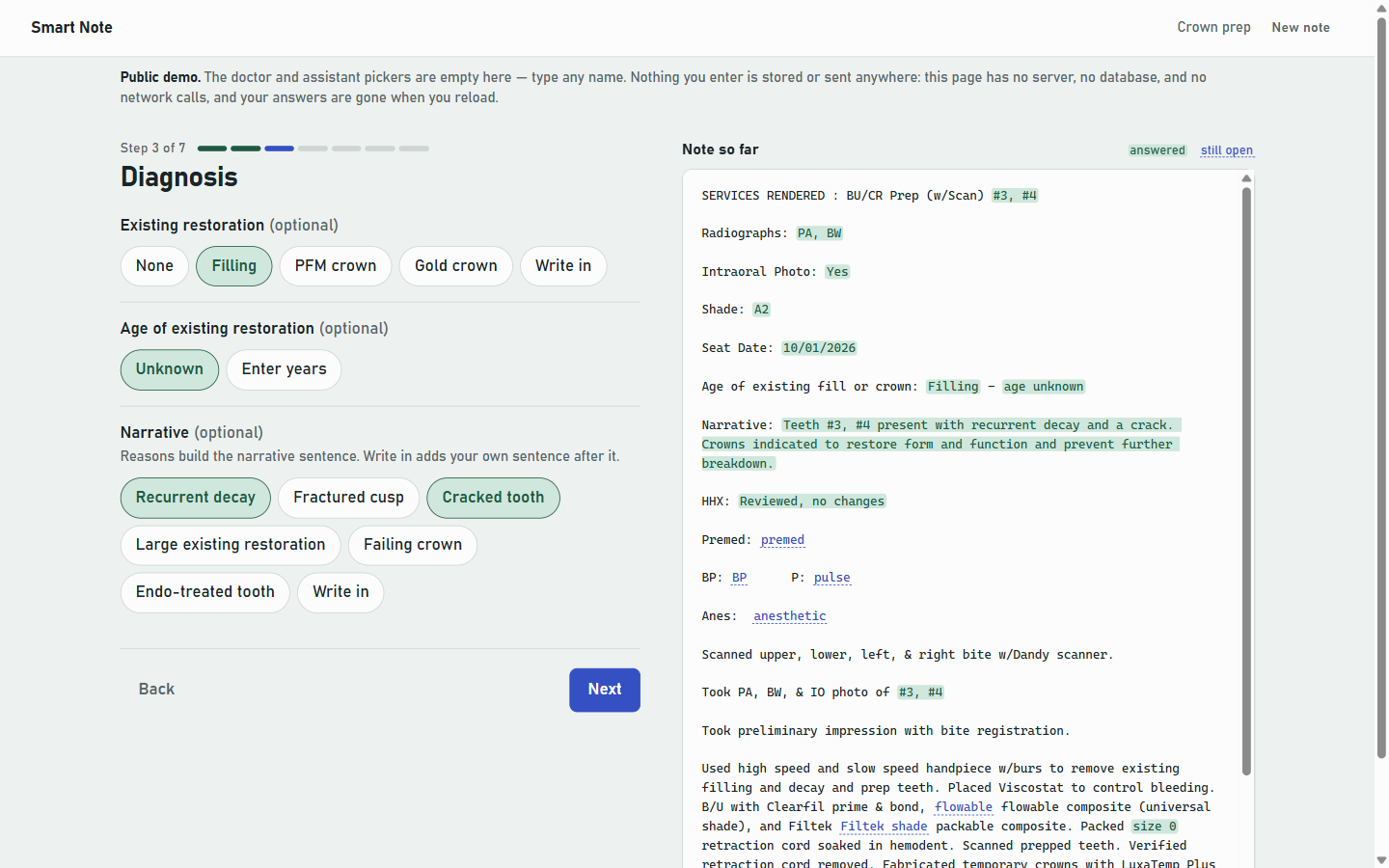
Three procedures so far: crown prep, a composite restoration, and an adult prophy hygiene note. Crown prep walks through tooth chart, records, diagnosis, health history, anesthesia, procedure, lab and sign-off. Only the questions that apply are shown — choose a different shade guide and you get that guide's shades.
The note as you go
The finished note sits beside the prompts and fills in as you answer. Answered spans are green, open ones blue-dashed, so a blank is visible before you finish rather than after.
Editable, then copied
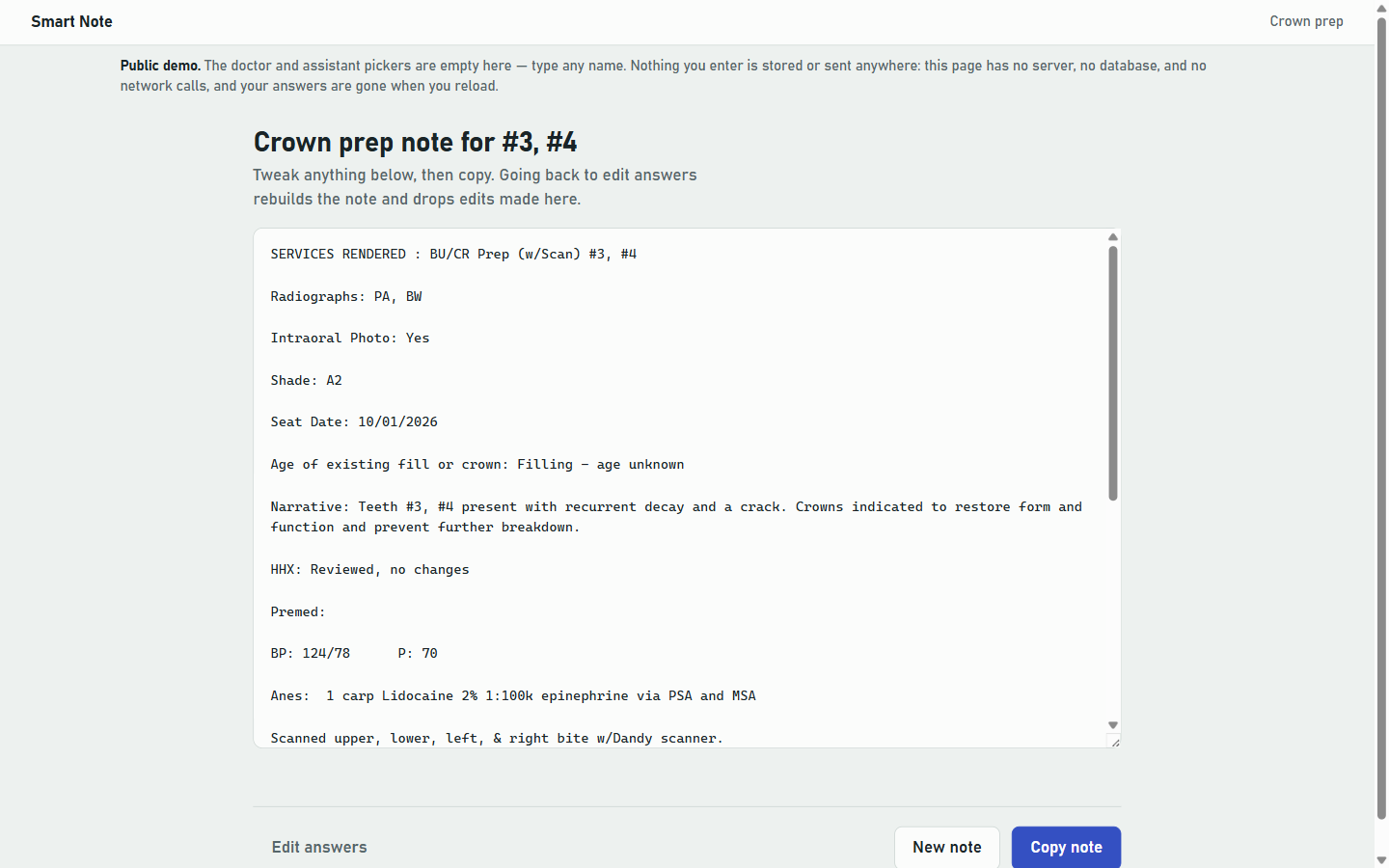
The last screen is the note in a text box. Change anything, press Copy, paste it into the chart. That is the end of the app's involvement.
02 Why I built it
Snippet expanders and canned templates get most of the way there and then leave the fiddly part behind: the note still has to agree with itself. One tooth or three changes "presents" to "present" and "crown" to "crowns" in four places. A lower molar makes half the injection-site list wrong. A blank field leaves a dangling colon that someone has to notice and delete. Those are small things individually, and collectively they are why templated notes end up hand-edited every time — which is most of the work the template was supposed to remove.
So the interesting part of this project is not the form. It is that the note is composed rather than filled in: the template describes how to say things, and the app assembles a sentence that agrees with the answers it was given.
03 What I built & how it works
One file, split in half. Above the line, procedures as data. Below it, a small engine that knows nothing about dentistry.
Fig. 1 — the preview and the finished note come from the same builder, so they cannot disagree about what the note will say.
One builder, two modes
A template returns its note from a single build(answers, h). The helper h.slot('shade') returns the answer wrapped in sentinel characters in preview mode and the bare answer in final mode — so the live preview is not a mock-up of the note, it is the note, drawn with markers. Two separate rendering paths would eventually drift, and the preview would start promising a sentence the finished note did not produce. Sharing one builder makes that impossible rather than unlikely.
The sentinels are private-use codepoints, so they cannot collide with clinical text, and the note is HTML-escaped before they are converted to highlight spans — the note is treated as untrusted text the whole way through.
Composition, not substitution
Counts drive wording. One tooth gives "Tooth #3 presents with recurrent decay and a crack. Crown indicated to restore form and function"; three teeth gives "Teeth #3, #4, #5 present with…" and "Crowns indicated…", and the temporary becomes plural to match. Reasons picked from a list are joined into one grammatical sentence rather than pasted as fragments. Selecting a lower tooth filters the injection sites to the mandibular ones, so the anesthesia section cannot offer a nerve block that belongs to the other arch.
Write-ins everywhere
Every chip list, the yes/no toggles, the tooth chart, and both halves of the anesthesia row carry a free-text Write in option. Typed text is merged over the chosen option before the template ever sees it, so a write-in behaves exactly like a built-in choice downstream. The fixed list covers the common case; the write-in covers the case the template author did not think of, which in clinical work is not a rare event.
04 🛠 Skills & tech used
05 Notable challenges & decisions
Most of the decisions here are subtractions — the interesting ones are what the app deliberately will not do.
Nothing is stored, and something checks
Note content is protected health information. The app keeps answers in one JavaScript object for the life of the tab — no database, no file, no localStorage, no cookie — and makes no network calls at all. The cost is real: reload mid-note and you start over, because there is no autosave. That was accepted knowingly. Autosave would put clinical text on a shared operatory workstation where it would outlive the appointment; re-answering takes about a minute, and a retention problem lasts until someone finds it. The build script asserts that the storage and network APIs stay absent, so the claim on this page is verified mechanically rather than remembered.
The preview cannot lie about the note
The obvious way to build a live preview is a second renderer that approximates the output. It also guarantees that one day the preview shows a sentence the finished note does not contain. Calling one builder twice with a different slot helper costs a mode flag and removes the whole class of bug.
A full redraw that does not lose your place
Answers change which questions exist, so the form redraws on every pick — and a naive redraw throws away keyboard focus. Every control carries a stable data-focus key; the renderer captures the active one before redrawing and restores it after. Text fields take the other path and update the preview in place, so a redraw per keystroke never fights the caret.
Warn, do not block
A blood pressure of 180/110 or higher raises a note to recheck and consider deferring elective treatment. It is advisory and never prevents finishing the note. The app's job is to write down what the clinician decided, not to gate the appointment on a threshold — a tool that blocks gets worked around, and a workaround is worse than a reminder.
Buttons that say what the chart should say
The hygiene note is a skeleton of labels (tissue, plaque, calculus, bleeding, stain, perio classification) that used to be typed from scratch. The tap-to-fill choices follow published sources where one exists: the 2017 AAP/EFP classification for stage, grade and extent, and CDT nomenclature for services. The amount words ("light / mod / heavy") are the conventions US hygiene programs teach, and I treated them as convention rather than standard. Every list keeps a Write in, and a note with nothing picked reproduces the office's original skeleton line for line.
No framework, on purpose
It runs on an operatory PC from a desktop shortcut, sometimes with the practice network down. Every dependency is something that can fail to load at the moment someone is trying to finish a chart. A single file with no imports either opens or does not — and with no third-party code, there is no other party that could receive a note.
A composition aid, not a record system. The chart still lives in the practice management software. This writes text and hands it over; it keeps no copy, has no accounts, and has no audit trail — because it holds nothing worth auditing.
06 Results
Counted from the source. The engine is ~610 lines; the rest is the three templates and their shared option lists. The second procedure needed no engine change at all and the third added one question type, while the crown-prep note stayed byte-identical across every change.
07 Screenshots
Captured from the public build. Every clinical value shown is invented — there is no patient here.
08 Honest status
This is a small, focused practice utility, and the scope is genuinely narrow: three procedures are implemented — crown prep, composite restoration and adult prophy — with perio maintenance and pediatric prophy planned next. The two newest were transcribed from photographs of the office's Notepad skeletons and have not yet been checked against the files themselves. It is Universal tooth numbering only, with no primary-tooth lettering, and there is no print styling because the workflow ends at the clipboard. An unanswered slot in the middle of a sentence leaves a doubled space; the obvious repair would break the note's deliberate column alignment, so it is documented rather than papered over. There is no test suite — the app is a pure function from answers to text, and the honest check is walking a procedure and reading the note, which is what the build notes ask you to do.
It is not a clinical record system and does not try to be: no accounts, no audit trail, no retention, no PHI handling to speak of, because it deliberately holds nothing. The demo linked above is the same code as the working copy with a demo banner added — not a reduced or defanged version.
Smart Note — run it yourself
A chairside clinical-note generator for a dental practice: pick a procedure, answer prompts, copy a finished note into the practice management software.
Prerequisites: a web browser. That is the whole list. No install, no server, no build step, no package manager, no network. If you can open an HTML file you can run this.
Tier 1 — Open it (recommended)
Double-click clone/index.html, or drag it into a browser tab.
That is the entire setup. It works offline, on an air-gapped machine, from a USB stick.
Tier 2 — Serve it over HTTP
Only needed if you want it on a phone or another machine on the same network.
cd clone
python -m http.server 8123
Then open http://<this-machine>:8123/. Any static file server works — there is nothing to
configure, because there is no back end to point it at.
Tier 3 — Put it on a static host
Upload clone/index.html to any static host (Cloudflare Pages, GitHub Pages, S3, a folder your
web server already serves). There is no build output to generate and nothing to configure.
Verify
- The procedure list appears with Crown prep, Composite restoration and Adult Prophy 1. (In Composite restoration, pick teeth #3 and #8: each gets its own row of surface buttons, and #8 offers I and F because it is a front tooth.) (Open Adult Prophy 1 and press Next to the end without picking anything: the note is the office's label skeleton with the defaults filled in and every other label left blank.)
- Pick it, then pick tooth #3. The preview on the right fills in
SERVICES RENDERED : BU/CR Prep (w/Scan) #3and highlights it green. - Also pick #4 and #5. The narrative should switch to plural — "Teeth #3, #4, #5 present with…" and "Crowns indicated…". Getting singular here would mean the build is wrong.
- Step to Anesthesia. Because #3–#5 are upper teeth, the injection sites offered are maxillary (PSA, MSA, ASA, greater palatine, nasopalatine) plus the ones that apply to either arch. Go back and pick a lower tooth instead and the list becomes IANB, lingual, long buccal, mental, and so on.
- Finish the steps and press Build note. You get an editable note and a Copy button.
What it does not do
Worth being clear, because these are choices rather than gaps:
- Nothing is saved. No database, no file, no
localStorage, no cookie. Answers live in the page and are gone when you reload. Note content is protected health information; the simplest way to have no retention question is to retain nothing. - Nothing is sent anywhere. No API calls, no analytics, no fonts or scripts fetched from a CDN. The only data that leaves the page is the note you copy, when you press Copy.
- No accounts, no multi-user, no audit trail. It is a text-composition aid, not a record system. The record lives in the practice management software, where it already belonged.
- No autosave or draft recovery. Reload mid-note and you start over. That is the direct cost of the point above and it was accepted knowingly — a note takes about a minute to re-answer.
Adding another procedure
Procedures are data, not code. One registerTemplate({ id, name, steps, build }) call near the top
of the file adds a procedure; the engine below it does not change. Question types available to a
template are text, number, date, chips (single or multi), yes/no toggle, a Universal 1–32 tooth
chart, a counter, and a repeatable anesthesia row. Any of them can be conditional on an earlier
answer, and chips, toggles and the tooth chart all get a free-text "Write in" option automatically.
Notes and gotchas
- The staff pickers list the practice's own staff. To use it elsewhere, edit the
doctors,assistantsandhygienistslists inLIBnear the top of the file; every picker also has a Write in choice for a name that is not listed. - Universal tooth numbering (1–32) only — no primary-tooth lettering.
- An unanswered slot inside a sentence leaves a doubled space (clear the crown material and you get "fabrication of crowns"). Label lines are unaffected. Left alone deliberately: the obvious fix is collapsing repeated spaces, and the note format uses run-of-spaces alignment on purpose, so the repair would break the layout to tidy a case the live preview already shows you.
- The clipboard button needs a secure context in some browsers — over plain HTTP on a remote host it may fall back to select-and-copy. Opening the file directly, or serving over HTTPS or from localhost, avoids it.