01 Overview
SmileVision is a self-hosted web app for a cosmetic-consult conversation at the chair: a clinician uploads or camera-captures a patient's smile photo, the system automatically segments the visible teeth, runs a small clinical-esthetics analysis, inpaints an "ideal" smile with Stable Diffusion on a separate GPU, whitens toward a target shade, composites the result back onto the original photo, and shows a zoomed before/after slider. It carries a plain disclaimer — an AI-generated visualization for discussion only, not a treatment plan or a guarantee of outcomes.
Reads the smile
Segments the teeth, then measures lip line, dental midline, buccal corridors, and smile arc — from the segmentation label map alone.
Redraws the teeth
Zoom-crops the mouth and inpaints new teeth with Stable Diffusion on a remote GPU, then pastes the result back pixel-for-pixel.
Whitens & checks
Adaptive whitening toward a Vita white, an artifact scrubber, and a quality gate that silently regenerates until the checks pass.
02 Why I built it
I work in dentistry, and a cosmetic consult is often a hand-wave: "your teeth could look like this." The tools I found still required manually placing or picking template teeth, which is slow with a patient in the chair. I wanted the visualization to come from the patient's own photo in roughly one click — segment the mouth automatically, generate into it, and composite back — so the result is grounded in their smile rather than a stock template. It sits alongside my clinical-documentation tools as the patient-facing, "let's talk about it" piece, which is why it leads with a disclaimer and stays deliberately modest about what it claims.
03 What I built & how it works
CPU vision on the server; the GPU diffusion step runs on a GPU PC.
Fig. 1 — all CPU vision runs in a Docker container on the server; the diffusion step is delegated over the LAN to ComfyUI on a GPU PC's GTX 1080 Ti.
- Gate & prep — fix EXIF orientation, keep the ICC profile, reject too-dark photos with an actionable message, and downscale to a working copy of about 1500px.
- Parse & mask — Segformer face-parsing (19 classes; the inner-mouth class is the key one), then SAM2 for the teeth mask, with a MediaPipe FaceMesh fallback on close-up shots.
- Analyze — measure lip line, dental-vs-facial midline, buccal corridors, and smile arc from the label map, and draw an annotated overlay with the classifications.
- Inpaint — zoom-crop the mouth region, send it to ComfyUI on the GPU PC, and paste the generated teeth back onto the original at full resolution.
- Whiten & gate — adaptive LAB whitening toward a Vita A1/B1 target and an artifact scrub, then accept the variation or silently regenerate it, up to three times, until the checks pass.
- Present — a before/after slider auto-framed on the detected mouth, plus a mask-debug tab and a "Recent Patients" history grid.
04 🛠 Skills & tech used
05 Notable challenges & decisions
Most of the real work was making a generative result behave like a clinical one.
Measuring a smile from the label map alone
The clinical module derives lip line, dental-vs-facial midline, buccal corridors, and smile arc geometrically from the segmentation — no extra model. Small choices mattered: the midline compares a nose-bbox midpoint to the upper-mouth bbox midpoint because a bounding-box midpoint is distribution-invariant, and the thresholds are framed against published esthetics ranges rather than invented.
A quality gate so the clinician never sees the failures
Diffusion output is inconsistent, so every variation is checked on several signals — overall brightness, a dark-pixel floor, a texture-variance test that catches flat "denture-slab" output, that pixels outside the mask are untouched (SSIM), and near-zero change inside. A failing variation is silently regenerated up to three times, with a last-resort fallback, so only passing results surface.
The inpaint silently did nothing
Early runs came back visually unchanged. The cause was encoding the crop with a plain VAE encode instead of the inpainting-specific 9-channel latent — the model was technically running but had nothing to work against. Switching to the inpaint encode, and forcing a higher guidance for the inpainting checkpoint, made the step actually change teeth.
Teeth were too few pixels to look real
Inpainting the whole frame left the teeth at roughly 23×10 latent tokens — not enough for coherent detail. The fix was to zoom-crop a padded window around the mouth, inpaint that at model resolution with a minimum crop height, then paste back — spending the pixel budget where it shows.
The negative prompts caused the artifact they fought
Prompting against "interdental shadows" pushed the model toward flat, white, featureless slabs — the opposite of natural teeth. Removing those negatives, nudging toward real tooth separation, and adding a variance check to detect slabs did more than any single prompt term. I also declined a fabricated esthetics metric the research draft suggested, rather than encode a made-up number.
Where I stayed honest about scope. The proportion-guide picker (Levin golden, RED 70/80, Snow) renders an esthetic overlay but does not yet steer generation — there is no ControlNet in the workflow, so it informs analysis, not the output. And rather than declare a winner between the pre- and post-whitening-overhaul builds, I kept versions running side by side to compare, with an on-demand launcher sleeping the idle ones.
06 Results
Sources: project git history and commit messages, task-summary notes, and the on-disk source. Figures are from development runs, not a controlled benchmark.
07 Screenshots
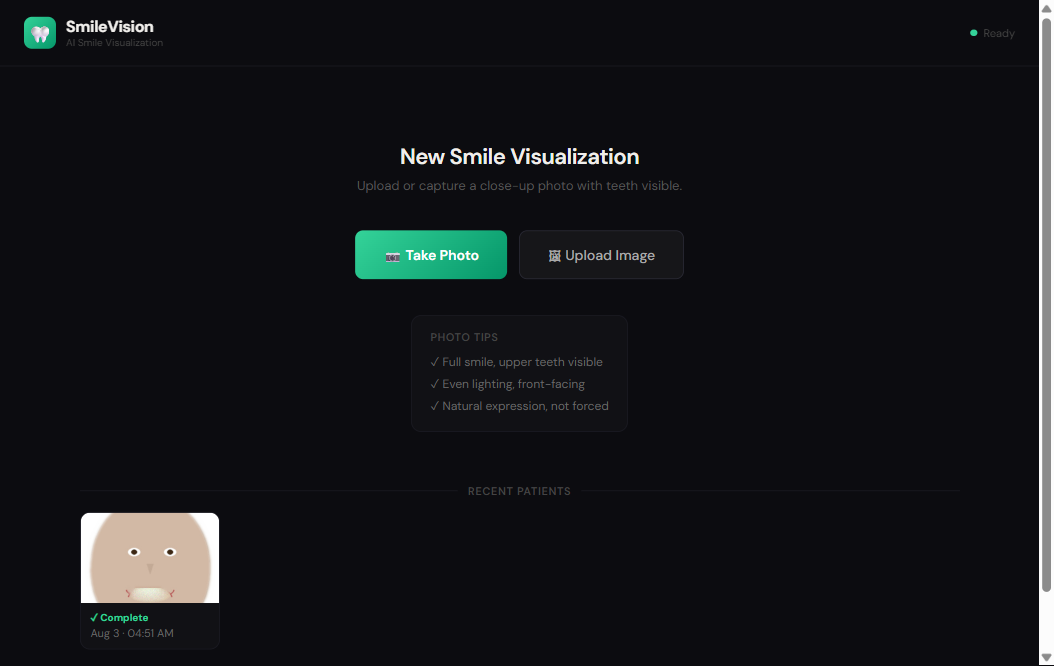
The interface shot below is from the verified runnable clone (Steps to Build tab) — it processes only a synthetic, computer-drawn face, never a patient. Real patient jobs are never shown (consent/provenance can't be confirmed).
Segformer class map → 5-step SAM2 gallery
lip line · midline · buccal corridors · smile arc
08 Honest status
SmileVision was built and iterated heavily over about a week and a half in March 2026, then development stopped. Three versions were kept running as a deliberate comparison; the March 26 build is the one I kept always-on and treat as the working version, still healthy on the LAN at :8231. One caveat to be clear about: this mar26 build predates a later whitening overhaul, so the ambient-luma gate, dark-spot/artifact scrubber, and adaptive LAB whitening described above actually live in a separate, currently-parked build — a visitor on :8231 sees the base analysis-and-inpaint pipeline, not those whitening stages. The two other containers were later removed as collateral during an unrelated server cleanup, so the app is not the polished, finished product a screenshot might imply.
It is LAN-only with no authentication, a home-lab convenience, not production security. A full generation also depends on the GPU PC's ComfyUI being awake, which it often isn't; without it the earlier stages (upload, mask, clinical analysis, age estimate) still run. Camera capture needs a secure context, so upload is the reliable path over plain HTTP. And to be clear about the domain: it is a discussion aid, explicitly not a diagnosis, treatment plan, or promise of any outcome. Update (2026-08-02): a runnable, PHI-safe clone (Steps to Build tab) now exists — it ships zero patient imagery (the real photos live only in server-side data volumes and were never in the source tree), runs the full CPU vision pipeline key-free with a mock generation backend, and was verified end-to-end on a synthetic, computer-drawn face. It's the mar26 lineage, so it demonstrates the segment→analyze→composite pipeline, not the parked whitening overhaul. Update (2026-08-10): the hosted live demo now runs the real generation path — the same ComfyUI inpainting workflow, executed on an on-demand serverless GPU with the same SDXL checkpoint the working build defaulted to. A warm generation takes roughly 12 seconds; a fully cold visit can take a couple of minutes while the container and GPU wake. If the GPU backend is unreachable the demo degrades to the labeled mock composite rather than failing, and the result card states which backend actually produced the image. The clone's key-free default remains the mock.
SmileVision AI — Build Recipe
Take a bare machine to a running copy of a dental "ideal smile" / whitening visualization web app. Upload a smile photo and a CPU-only computer-vision pipeline segments the visible teeth (Segformer face-parsing → SAM 2 promptable masking), runs a clinical-esthetics analysis (lip line, dental midline, buccal corridors, smile arc), builds an inpainting mask, generates an "ideal smile" into that region (mock by default), composites the result back pixel-exactly, validates that pixels outside the mask are untouched, and presents a zoomed before/after slider for chairside patient discussion.
Key-free and GPU-free by default. Out of the box the app runs the whole
vision pipeline on CPU and uses a built-in mock inpainting backend
(SV_METHOD=dummy) — a whitened composite blended into the detected mouth mask.
No GPU, no model download for generation, no API keys. Real Stable-Diffusion
generation is opt-in against your own ComfyUI, and the LLM age-estimator is
opt-in against your own endpoint (both off by default).
This is a partial clone of a larger personal project — the single canonical web app + CPU pipeline, collapsed from a three-version / multi-machine deployment down to one self-contained build (see What was stripped).
Status: ✅ Verified 2026-08-02 — built from this clone on a Linux Docker host (
docker compose up -d --build). The service came up healthy on:8231key-free and GPU-free (SV_METHOD=dummydefault); a real end-to-end run on the bundled synthetic face (upload → Segformer/SAM segmentation → clinical analysis → mock composite → validation) completed on CPU in ~75 s and produced a before/after result. The UI rendered with only a benign favicon 404, and the "Recent Patients" thumbnail is the unmistakably-synthetic sample face. All three tiers covered; the prebuilt tarball (docker save smile-vision-clone) size is recorded in../PREBUILT_IMAGES.md.Sensitive data: none — PHI-safe by construction. All ~638 patient photos on the live server live only in Docker data volumes and were never in the git source tree; this clone ships zero patient imagery — the only faces are synthetic, PIL-drawn samples (see
clone/samples/ATTRIBUTIONS.md). Nodata//jobs/dir ships; real generation is opt-in against your own ComfyUI.PHI-safety — read this. SmileVision's real inputs are patient smile photographs. None of them ship here — none, by construction. The original app's ~638 patient and test photos live only in Docker data volumes on the author's server; the git-tracked source tree this clone was built from contains zero images (verified with
findover the copied tree — the only images anywhere in the clone are three synthetic, PIL-drawn faces underclone/samples/, see below). The clone ships only source code, a self-contained Dockerfile, and that synthetic sample face. Nodata/, nojobs/, nometa.json, no patient filenames, no bundled dataset. All secrets are placeholders; the author's LiteLLM key and.envwere never copied.
What it is
One container: a FastAPI service (src/api.py, port 8231) that serves a
build-less React 18 single-page UI (src/static/index.html, no build step)
and runs the pipeline (src/pipeline.py) in a background thread. The vision
stack is ~14 Python modules — face parser, SAM 2 masker, clinical analysis, mask
post-processing, golden-ratio guide, compositor (alpha / Poisson / lab-matched
blend), validation, and a multi-backend teeth generator whose default backend
is the GPU-free mock.
| Piece | Role |
|---|---|
api.py |
FastAPI: upload / generate / status / image / jobs / health; serves the UI |
pipeline.py |
Orchestrator: parse → mask → clinical analysis → mask post-proc → generate → composite → validate |
face_parser.py |
Segformer jonathandinu/face-parsing (19 classes) + MediaPipe close-up fallback |
maskers/sam2_masker.py |
facebook/sam2.1-hiera-small, bbox+point prompts, multi-candidate best-IoU |
clinical_analysis.py |
Lip line / midline / buccal corridors / smile arc → annotated overlay + prompt modifiers |
mask_processor.py |
Denoise, fill, asymmetric dilation, morph-close, Gaussian feather |
golden_ratio.py |
4 proportion systems (Levin golden / RED70 / RED80 / Snow) guide overlay |
teeth_generator.py |
Inpainting backends: dummy (default) / comfyui / replicate / local |
compositor.py |
Alpha / Poisson / LAB-matched blend — pastes the generated region back so pixels outside the mask are untouched |
validation.py |
SSIM/MSE checks that pixels outside the mask are untouched |
age_estimator.py |
Opt-in vision-LLM age → age-appropriate prompt prefixes |
Prerequisites
New machine? See ../SETUP.md for the base tools. Then, per tier:
| Tier | You need |
|---|---|
| 1 — prebuilt container (recommended) | Docker Desktop / Engine. Load the on-request image tarball and run — nothing to build. |
| 2 — build from source | Docker Desktop / Engine. docker compose up --build compiles the image (torch + transformers + the ~500 MB of CPU vision models are baked in — a few minutes). |
| 3 — bare-metal | A host with Python 3.11 and the OpenCV system libs; run the one service directly with uvicorn. |
Tier 1 — Run the prebuilt container (recommended)
Availability: the prebuilt image is available on request — it is not published or linked anywhere. Ask Kevin for it, or build from source (Tier 2).
# --- produce the tarball once (on a machine that has already built the image) ---
docker save smile-vision-clone -o smile-vision-clone-image.tar

# --- consume it anywhere (no --build; the image is already loaded) ---
docker load -i smile-vision-clone-image.tar
cd clone
docker compose up -d                  # → http://localhost:8231
curl -s localhost:8231/health         # → {"status":"ok","service":"smile-vision"}
The image is honestly large — it bundles CPU torch + transformers plus ~500 MB of pre-downloaded vision models (Segformer ~323 MB, SAM 2-small ~185 MB). That is the price of a self-contained, key-free CV pipeline with no runtime model download for the vision stages.
Tier 2 — Build from source
cd clone
docker compose up -d --build          # → http://localhost:8231
Open http://localhost:8231, upload a smile photo (or drag in
samples/synthetic_smile.png), and click Generate. With the default
SV_METHOD=dummy the pipeline runs end-to-end on CPU — face parse → SAM 2 mask →
clinical analysis → mock whitened composite → before/after slider — with no
GPU and no keys.
First request is slow. The container cold-loads (and, if it could not pre-download at build time, fetches) the vision models on the first generation. After warm-up, the CPU vision stages are quick (the original measured a face parse and a SAM 2 mask at ~2 s each on a downscaled working image). A GPU is a pure speed-up for the optional Stable-Diffusion path, never a requirement for the default flow.
Tier 3 — Bare-metal (one process)
cd clone
python -m venv .venv && . .venv/bin/activate     # Windows: .venv\Scripts\activate
# CPU torch keeps the install lean:
pip install torch torchvision --index-url https://download.pytorch.org/whl/cpu
pip install -r requirements.txt
# (needs OpenCV's system libs — libgl1, libglib2.0-0 — on Linux; see Dockerfile)
SV_METHOD=dummy SV_DEVICE=cpu PYTHONPATH=src \
  python -m uvicorn api:app --app-dir src --host 0.0.0.0 --port 8231
# → http://localhost:8231 ; jobs are written to clone/data/jobs/ (gitignored)
There is also a GPU-free, key-free, photo-free smoke test that draws a synthetic face and runs the whole pipeline mechanically (with a synthetic-mask fallback so it needs no models at all):
PYTHONPATH=src python src/quick_test.py
Optional: real Stable-Diffusion generation (your own ComfyUI + GPU)
The dummy backend is a placeholder composite, not a real smile simulation.
To generate an actual inpainted smile, point the app at your own ComfyUI
server — nothing is bundled, and no model is downloaded by this clone:
# in clone/.env  (copy from .env.example)
SV_METHOD=comfyui
COMFYUI_URL=http://your-comfyui-host:8188
COMFYUI_CHECKPOINT=sd-v1-5-inpainting.ckpt
The app offers four generation engines (Settings → Generation Engine); all speak the stock ComfyUI HTTP API against your own GPU host:
- Qwen Restyle (default, added 2026-08-15): base Qwen-Image + the InstantX
inpainting ControlNet at partial denoise — keeps the patient's own dentition
and cleans/whitens it. The mouth region is cropped and generated at high
resolution automatically. Needs on the ComfyUI host:
qwen_image_fp8_e4m3fn.safetensors(diffusion_models),qwen_2.5_vl_7b_fp8_scaled.safetensors(text_encoders),qwen_image_vae.safetensors(vae), andQwen-Image-InstantX-ControlNet-Inpainting.safetensors(controlnet) — all open weights on Hugging Face (Apache-2.0 family). - Qwen Resynthesize: Qwen-Image-Edit-2511 instruction editing — rebuilds an
idealized smile (the right tool for missing-teeth cases). Needs
qwen_image_edit_2511_fp8mixed.safetensorsplus the same text encoder/VAE; the optional 4-step Lightning LoRA enables the "Fast" speed setting. - SD 1.5 (legacy) and SDXL (legacy): the original 2022/2023 pipelines, unchanged. Checkpoints with "inpaint" in the filename get an InpaintModelConditioning graph (true fill); others fall back to VAEEncode + SetLatentNoiseMask (masked img2img restyle).
This is a GPU workload you host yourself; the original ran the legacy engines on a GTX 1080 Ti at roughly ~57 s per 512×512 / 30-step generation; the Qwen engines want a 24–48 GB GPU (e.g. L40S-class) and run ~15–20 s warm.
Optional: anatomical guide (Qwen Restyle only)
Settings → Anatomical Guide renders the selected Proportion System's tooth
outlines (nose/pupil-anchored midline) as a lineart image and conditions
generation through the InstantX Union ControlNet
(Qwen-Image-InstantX-ControlNet-Union.safetensors, controlnet/ dir on the
ComfyUI host), chained after the inpainting ControlNet. Guide strength
0.3–0.9 is a genuine "patient anatomy ↔ ideal geometry" dial. Not available
on Resynthesize: no ControlNet exists for the Qwen Edit models, and passing
the guide as a reference image reframed outputs in testing.
Optional: extra diagnostics & maskers (added 2026-08-16)
- Interpupillary line, head pose & occlusal cant:
pip install mediapipeplus the Face Landmarker task file (SV_MP_TASKpath; ~4 MB from Google's model CDN). Adds iris-anchored facial midline, a cant card (reported vs the pupil line AND roll-corrected vs head-rigid horizontal), and an out-of-plane pose warning. Fully optional — absent, the app runs as before. - EasyPortrait teeth masking (
mask_method: easyportrait):pip install onnxruntime+ the 15 MB ONNX (SV_EP_ONNX). One-pass CPU teeth-class masks (~0.1–0.7 s); tooth-tight and edentulous-gap-aware. - SAM 3 teeth masking (
mask_method: sam3): a remote GPU endpoint (SV_SAM3_URL) running facebook/sam3 (gated weights — request access on Hugging Face); text-prompted, tooth-tight union + per-instance map. The app FAILS OPEN to SAM2 whenever the endpoint is unavailable. - Local age estimation (
SV_AGE_BACKEND=facexformer): FaceXFormer (MIT, ~1 GB weights atSV_FXAGE_WEIGHTS,pip install --no-deps facenet-pytorch) replaces the LLM call with a sub-second deterministic CPU estimate; unset, the original LLM estimator behavior is unchanged.
Optional: LLM age estimation (your own endpoint)
Age estimation auto-suggests an age bracket (which tunes the generation prompt) from the portrait. It is off by default and speaks to any OpenAI-compatible endpoint:
# in clone/.env
LITELLM_URL=http://your-litellm:4000       # or a local Ollama, key-free
LITELLM_API_KEY=your-key-or-ollama
LITELLM_VISION_MODEL=gpt-4o-mini           # a vision-capable model your endpoint serves
With LITELLM_URL unset, age_estimator.py short-circuits and the clinician just
picks the bracket manually — the pipeline is unaffected.
The sample face — provenance
The before/after showcase uses only a 100% synthetic, PIL-drawn face — a
cartoon of ovals, arcs, and lines, not a photograph of anyone. It is generated by
the exact code that ships in src/quick_test.py (create_test_image) and
src/teeth_generator.py (_generate_dummy), so its provenance is verifiable by
construction. See clone/samples/ATTRIBUTIONS.md.
The three files (synthetic_smile.png, synthetic_smile_after_dummy.png, and a
before_after_dummy.png strip) are public-domain / CC0. No patient photo, and
no third-party photograph, appears anywhere in this clone.
Verify
curl -s localhost:8231/health                 # → {"status":"ok","service":"smile-vision"}
curl -s localhost:8231/api/jobs               # → [] on a fresh boot (empty — no bundled jobs)
Then open the UI, upload samples/synthetic_smile.png, and click Generate —
the mask, clinical overlay, and a mock whitened before/after render, key-free.
Provenance — models, data & measured facts
Models (downloaded from Hugging Face at build/first-run, not authored here).
Segformer jonathandinu/face-parsing (~323 MB) for 19-class face parsing, and
Meta's SAM 2.1 Hiera-small (~185 MB) for promptable tooth-region masking.
These are public pretrained weights; no model was trained for this project,
and no training data is involved in running it.
Measured facts (from the author's development notes, stated honestly).
Applies to what this clone ships (the mar26 lineage): - SAM 2 mask quality: ~0.877 IoU typical on the author's inputs. - Optional SD generation timing (opt-in ComfyUI path): see below.
From a later "Current" build's whitening/quality overhaul — described here as development history; this mar26-based clone does not include these stages (its compositor is blend-only and there is no per-variation quality gate): - Whitening stability: switching from fixed offsets to adaptive per-pixel LAB normalization to a target L* cut run-to-run variance from ±8 L* to <1 L* (fixed offsets gave Vita A2 one run, A3 the next under SD variance). - Whitening targets: upper arch L*=88 (≈ Vita A1/B1), lower-arch pass L*=87, ceiling 93, with a 12 L* minimum-perceptible-change floor. - Quality gate per generated variation: brightness>145, P25>100, std>18, SSIM outside the mask >0.99 — with up to 3 silent regenerations per slot. - CPU working-resolution speedups: face parse and SAM 2 each ~15 s → 2 s, SSIM ~65 s → 5 s, after downscaling large photos to a ≤1500 px working copy. - Optional SD generation: ~57 s per 512×512 / 30-step run on a GTX 1080 Ti (the author's GPU host — not part of this clone).
The original was ~6 k lines across the "Current" build and ~5.6 k across the "mar26" snapshot this clone is based on; it grew from a Phase-1 drop of 9 files / ~2,369 lines over 25 commits (2026-03-27 → 03-31).
What was stripped from the personal version (de-identification + minimalism)
- The three-version / multi-machine deployment. The original ran three side-by-side builds (a "Current" overhaul, and Mar-26 / Mar-27 snapshots) behind a Node/dockerode wake-proxy launcher, with Stable-Diffusion delegated over the LAN to a ComfyUI on a separate GPU PC. Collapsed to one self-contained container that runs the CPU pipeline + mock backend locally; real SD is opt-in against your ComfyUI.
- The broken base image.
mar26's Dockerfile wasFROM smile-vision-new:latest(a personal layered image that has since been deleted, so it could not rebuild). Replaced with a full self-contained build (python:3.11-slim+requirements.txt - a cached model-download layer).
- A hardcoded LAN IP — the compose
COMFYUI_URLpointed at a private LAN address (the author's GPU host) → an unset placeholder (.env.example); the default flow never dials it. - A hardcoded internal LiteLLM alias —
age_estimator.pyhadhttp://litellm:4000/...baked in → made env-driven and opt-in (LITELLM_URL, unset = disabled), with the personal model alias (free-vision) replaced by a configurableLITELLM_VISION_MODEL. - The LiteLLM key. The
mar26compose referenced${SMILE_VISION_LITELLM_KEY}from a server-side.envholding a real key — that.envwas never copied; a placeholder.env.exampleships instead. - A personal hardware reference — a specific workstation model named in
requirements.txtand aquick_test.pyhint → genericized to "your own GPU / your own ComfyUI". - The legacy JSX UI (
SmileVisionApp.jsx, unused, hardcoded a dev port) → dropped; only the productionindex.htmlships. - A server's local hostname in a design doc →
localhost. - The entire patient/test image surface (~638 photos across four Docker data
volumes, with
meta.jsonclinical geometry and phone-camera filenames) — never in the source tree, never copied. Fresh empty volumes; the app boots with an empty job list. - The SAM 2 pre-download mismatch — the original image pre-fetched
sam2.1-hiera-base-pluswhile the code loadssam2.1-hiera-small; the clone pre-fetcheshiera-smallso the baked layer is actually used.
Known limitations (stated honestly)
- The default backend is a mock, not a smile simulator.
SV_METHOD=dummycomposites a flat lightened fill into the mask — it demonstrates the pipeline (segmentation, clinical analysis, mask building, compositing, validation), not a realistic generated smile. A real result needs the opt-in ComfyUI + GPU path. (The hosted demo ships with that real path enabled — see Hosted-demo notes.) - This clone is the mar26 lineage — blend-only compositor, no whitening or quality-gate stages. The adaptive-LAB whitening, 3-pass artifact scrubber, and per-variation quality-gate-with-regeneration described in Provenance were a later "Current" build overhaul and are not in this shipped code (the compositor here does alpha / Poisson / LAB-matched blending only). Kept honest rather than back-porting an unshipped feature.
- The proportion-system picker has no effect on generated output. The golden-ratio guide is drawn and saved as an intermediate, but it is not fed to the generator (there is no ControlNet node in the workflow) — it is a visual guide, not a generation constraint. Kept as-is, flagged here for honesty.
- Personal-LAN tool: no authentication, permissive CORS (
*), one shared workspace. Put a reverse proxy with auth in front before exposing it. - Camera capture needs a secure context.
getUserMediarequires HTTPS orlocalhost; over plainhttp://<host>:8231browsers hide it — use file upload. - The UI loads React and fonts from CDNs (esm.sh, Google Fonts), so the demo machine needs internet for the page to render.
- The image is large (CPU torch + transformers + ~500 MB of vision models) — the honest cost of a self-contained, key-free CV pipeline.
- No training here. The clone runs finished public pretrained models on CPU; there is no dataset, no GPU step, and no retrain in this recipe.
Build gotcha discovered 2026-08-08 — verify the model bake
The Dockerfile's model pre-download steps are guarded with || echo … skipped so an
offline build still succeeds. On a host that TLS-intercepts HTTPS this SILENTLY produces
an image with an EMPTY model cache — the app then fails every generate with "Can't load
image processor for 'jonathandinu/face-parsing'". After building, verify the bake:
docker run --rm --entrypoint sh IMAGE -c "du -sh /root/.cache/huggingface" — expect
~500 MB, not KBs. (The deployed demo re-bakes models via a throwaway-CA build stage:
catalog/deploy/smile-vision-worker/Dockerfile.)
Hosted-demo notes (added 2026-08-10)
The public demo runs this same app with generation flipped ON: SV_METHOD=comfyui
pointed at a serverless-GPU deployment of stock ComfyUI (L40S). Since 2026-08-15
the demo defaults to the Qwen Restyle engine, with Qwen Resynthesize and the
two legacy SD engines selectable in Settings (the legacy pipelines are preserved
unchanged; a plain SDXL base checkpoint was dropped earlier because it did
masked img2img rather than inpainting). Compositing defaults to the direct
feathered blend — poisson's tone-solve measurably yellows whitened teeth on
real photos and remains available as the A/B option. Three generic,
off-by-default additions to the app support hosted mode — none changes LAN
behavior when unset:
MODEL_AUTH_BEARER— optional bearer attached to all ComfyUI calls (the endpoint is auth-fronted).SV_FALLBACK_TO_DUMMY=1— a failed remote generate degrades to the labeled mock composite instead of erroring the job; the job records which backend actually produced the result and the UI badges it honestly.SV_MODAL_PREWARM=1— photo upload fires a fire-and-forget wake ping so the GPU cold start overlaps the CPU preprocess stage.