⚙ How it works 📊 Results 🖼 Screenshots
01 Overview
Two no-build, vanilla-JS + Express + better-sqlite3 apps that share a single story: write a story with a language model, then hear it read back in a real neural voice. StoryForge (port 8234) is a family-shared story generator with no login and one shared workspace — a shared character pool, per-session context, 8 genres, exactly 5 AI plot hooks, and stories streamed token-by-token over SSE, with a read-aloud engine that plays a finished story paragraph-by-paragraph. TTS Studio (port 8221) is the shared voice engine: a dual-backend browser over roughly 54 local Kokoro voices plus about 30 styled "Gemini" voices. The two are deliberately coupled — StoryForge does no text-to-speech itself; it proxies its voice and audio calls to TTS Studio over the container network. It is a home tool for one household, not a product.
StoryForge
Shared character pool, per-session context points, 8 genres and 5 regenerable plot hooks, and SSE-streamed stories on a 300–5,000-word slider. No login — one shared family workspace.
TTS Studio
A dual-backend voice browser: ~54 local Kokoro voices grouped by language with flag emojis, plus ~30 styled Gemini voices, drag-drop text input, a live status dot, and a generation history.
Read-aloud
StoryForge proxies voices and audio to TTS Studio and reads a finished story aloud, prefetching three chunks ahead with retry/backoff, highlighting the active paragraph, and resuming from a failed chunk.
02 Why I built it
These were built as family-facing consumers of the home server's existing LLM and TTS stack — a way for anyone in the house to make up a story and then sit and listen to it. The design note for StoryForge is plain about the scope: a shared story-generation app where any family member can create a session and nothing is gated behind a login. TTS Studio started earlier as a standalone browser for the studio's Kokoro and Gemini voices; StoryForge's read-aloud feature is what turned it into the shared voice backend. Being honest, the shape of the read-aloud engine is the residue of a real failure: after a report that the voices "all sounded the same" on a phone browser — that was the browser's built-in Web-Speech, not a real neural voice — the TTS path was reworked onto server-side neural TTS, and then onto a three-ahead prefetch pipeline to hide the per-chunk latency.
03 What I built & how it works
One SSE story stream, one proxied voice engine, two neural-TTS backends, and a prefetch pipeline that keeps read-aloud smooth.
Fig. 1 — StoryForge streams a story from LiteLLM over SSE, then proxies /api/voices and /api/tts to TTS Studio, which synthesizes each chunk on Kokoro (key-free) or on Gemini via LiteLLM and streams the audio back for paragraph-by-paragraph read-aloud. Each app persists to its own WAL SQLite database (StoryForge → stories.db, 6 tables; TTS Studio → tts-studio.db). LiteLLM is opt-in.
- Write a story —
POST /api/sessions/:id/storiesstreams tokens over SSE from LiteLLM (modelpaid-chat). The server side is hardened for a flaky LAN: it excludestext/event-streamfrom compression, aborts onresclose, sets keepalive / no-delay / no socket timeout, and sends a 15-second heartbeat so nothing drops during first-token latency. Stopping discards the partial. - Ask for plot hooks — a prompt asks for exactly 5 hooks (25 words or fewer, as a JSON array); the reply is fence-stripped and parsed, with a newline-split fallback if the JSON doesn't parse.
- Chunk for speech — a finished story is split into per-voice chunk sizes (Kokoro 4000, Gemini 600, browser 220 characters) while recording each paragraph's first chunk, so the active paragraph can be highlighted.
- Prefetch three ahead — a
LOOKAHEAD = 3queue keeps up to three/api/ttsfetches in flight ahead of the chunk playing, each wrapped in a retry (3 attempts, linear backoff) under a singleAbortController. - Play, highlight, resume — each chunk plays through an
Audioobject URL (revoked on end/error) while the active paragraph is highlighted and auto-scrolled; a failed chunk is recorded and offered as a Resume, and every paragraph has a play button to start from there. - Synthesize — TTS Studio picks the backend by voice-name shape: Kokoro voices go to
/v1/audio/speech; Gemini voices go to LiteLLM (gemini-tts,modalities:['audio']), whose PCM16 is converted to a hand-built 44-byte WAV. Every generation is written to SQLite.
04 🛠 Skills & tech used
05 Notable challenges & decisions
Small apps, but the interesting parts are at the seams — a fragile streaming connection, a product pivot driven by real feedback, and a couple of trade-offs stated honestly.
SSE over a home LAN is fragile
Getting token streaming to hold up on the house network took a block of six specific fixes: aborting on res close rather than req, excluding text/event-stream from compression, setting keepalive / no-delay / no socket timeout, disabling proxy buffering, and — the clearest lesson — sending a 15-second heartbeat comment so a NAT or proxy doesn't drop the connection during the latency before the first token arrives.
A pivot from real feedback
The read-aloud engine's shape is the residue of a real failure. A report that the voices "all sounded the same" on a phone browser — that was the browser's built-in Web-Speech — drove the move to server-side neural TTS, and the audible gaps between chunks then drove the three-ahead prefetch with retry and resume-from-failure. The feature grew out of a complaint, not a spec.
Backend chosen by voice-name shape
One dropdown drives two very different backends. TTS Studio decides which one by the shape of the voice name — a leading xx_ means a Kokoro voice, anything else is treated as Gemini. It keeps the UI simple, at the cost of coupling correctness to a naming convention rather than real validation, which is a fair thing to be honest about.
Degrade instead of break
If the Kokoro server is unreachable, /api/voices reports it offline and the UI shows an offline banner rather than failing; the Gemini voices (through LiteLLM) keep working, and StoryForge's proxy degrades the same way. The status dot polls adaptively — slower when the backend is up, faster when it's down.
Honest limits. Both apps are unauthenticated and bound to all interfaces on the LAN — not behind any reverse proxy or tunnel — so they are home tools, not something to expose as-is. Story generation and the Gemini voices need a language-model endpoint; without one, those paths fail with a clear message while the key-free Kokoro read-aloud still works. A legacy per-story audio-cache route is left wired but effectively dead (zero rows in the live database), kept honestly for reference. And the source uses absolute paths, so it wants its own port or subdomain rather than a subpath proxy.
06 Results
Sources: the project dossier (read 2026-08-02), with the test count verified by reading each test file (health 1 + characters 6 + sessions 10 + stories 7 + audio 5 = 29) and both containers confirmed up and healthy on the home server that day. The Kokoro count (~54) is carried from an earlier survey — the GPU voice server was offline at the time of this one, so it was not re-counted. Source size is roughly 1,760 lines for StoryForge and 600 for TTS Studio. The live database is real family data and is deliberately never shown or shipped.
07 Screenshots
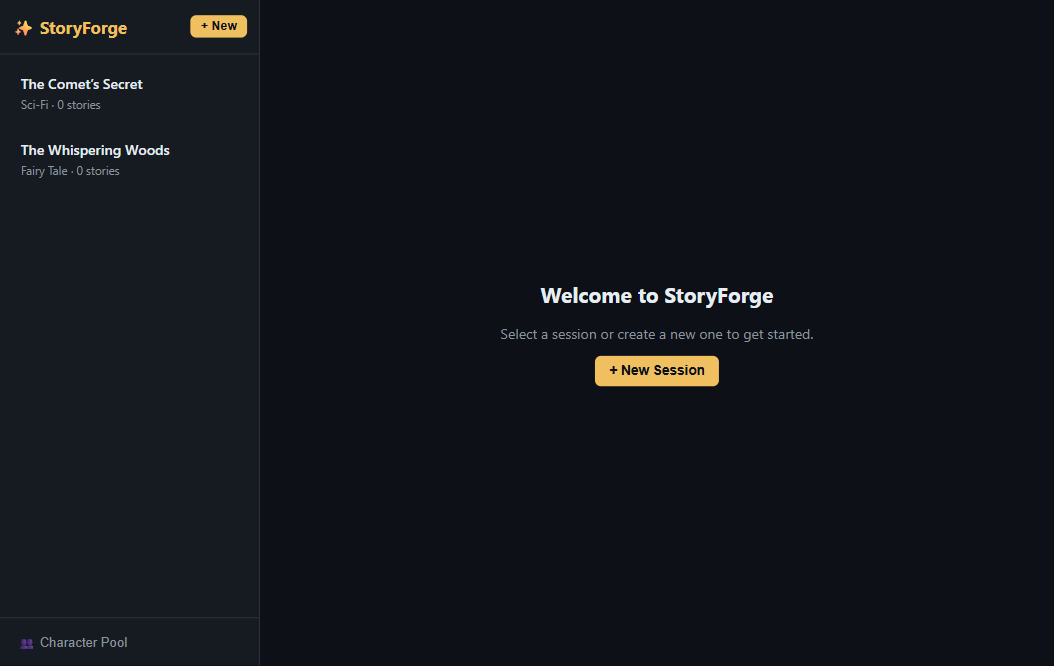
Captured from the de-identified clone, never the live instance — the live database holds real family names and stories, so nothing here is drawn from it; the clone boots with fully fictional characters instead.
flag-grouped Kokoro voice list + styled Gemini voices, a live status dot, and inline play
SSE heartbeats and token flow during a live story stream
08 Honest status
This is a pair of modest home tools, and that framing is deliberate. Both containers were built in spring 2026 (TTS Studio on 2026-03-10, StoryForge across 2026-03-31 to 04-02) and have run quietly and continuously on the home server since, verified up and healthy as recently as 2026-08-02. They are unauthenticated and LAN-only by design — bound to all interfaces, not behind any reverse proxy or tunnel — so they are not something to expose as-is. The story core depends on a language-model endpoint; that is off by default and fails with a clear message, while read-aloud still works without any keys — key-free Kokoro on CPU in the runnable clone, and an on-demand serverless GPU on the hosted demo, where full-story read-aloud runs at about two seconds per paragraph once warm. StoryForge is the only service in the wider home studio with an HTTP test suite (29 Jest tests that run offline against a mocked LLM). The one firm rule: the live database is family data — real names and stories about real people — and is never shipped or shown; the clone ships a fresh, empty database seeded with entirely fictional characters and two original sample stories, so read-aloud is demonstrable with no family exposure.
StoryForge + TTS Studio — Build Recipe
Take a bare machine to a running copy of StoryForge + TTS Studio — two coupled self-hosted services
that together do one distinctive thing: generate a story with an LLM, then read it aloud
paragraph-by-paragraph in a real neural voice, with a 3-ahead audio prefetch pipeline, retry/backoff,
and the active paragraph highlighted and auto-scrolling. StoryForge (:8234) is a family-style story
generator — shared character pool, per-session context, 8 genres, a 300–5,000-word slider, exactly 5 AI
plot hooks, SSE-streamed stories. TTS Studio (:8221) is a dual-backend voice browser (~54 Kokoro
voices + 30 styled Gemini voices). StoryForge does no TTS itself — it proxies /api/voices and
/api/tts to TTS Studio, which is the whole point of cloning them together.
Status: ✅ Verified 2026-08-02 — built from this clone on a Linux Docker host (
docker compose up -d --build). All three services came up healthy (story-generator:8234, tts-studio:8221, bundled kokoro-fastapi-cpu); the DB seeded 6 fictional characters (Captain Nova, Pip the Fox, Luna Quill, Bramble, Mira Stoneweaver, Old Salt) + two sample stories, and the key-free Kokoro voice list loaded (/api/voices→ 200) with no keys and no GPU. A browser pass showed the StoryForge sessions and the coupling to TTS Studio. All three tiers covered; the prebuilt tarball (docker save storyforge-tts-story-generator storyforge-tts-tts-studio+ the pulled kokoro image) is recorded in../PREBUILT_IMAGES.md.Sensitive data: none. The live DBs (real family character names + TTS history) are never shipped — a synthetic fictional-character seed replaces them; home-LAN voice-service coupling was replaced with the bundled key-free Kokoro service.
Sensitive data — read this. StoryForge's real database is family data: 15 real first names and 5 stories written about those people. None of it is in this clone. The shipped
stories.dbis created empty on first boot and seeded with fully fictional characters (Captain Nova, Pip the Fox, Mira Stoneweaver, Bramble, Old Salt, Luna Quill) and two short original sample stories written for the demo. No TTS history ships (empty on first run). The one rule when reproducing: never copy a runningstories.dbortts-studio.db— ship empty volumes, which this recipe does.
What it is
Three containers (the first two run by default; the LLM proxy is opt-in):
| Service | Stack | Role | Port |
|---|---|---|---|
kokoro |
remsky/kokoro-fastapi-cpu (upstream image) |
Key-free neural TTS backend — ~54 voices, CPU-only, no keys, no GPU. OpenAI-compatible /v1/audio/{voices,speech} |
8880 (internal) |
tts-studio |
Node 20 / Express + better-sqlite3 | Voice browser + TTS API; proxies Kokoro voices, converts Gemini PCM16→WAV | 8221 |
story-generator |
Node 20 / Express + better-sqlite3 | StoryForge web app + SSE story generation; proxies voices/TTS to tts-studio; DB seeded with fictional stories on first boot |
8234 |
litellm (opt-in, --profile llm) |
ghcr.io/berriai/litellm |
OpenAI-compatible proxy that unlocks live story generation + Gemini voices | 4000 |
Both frontends are hand-built vanilla-JS SPAs (no build step). The read-aloud engine (3-ahead prefetch,
retry/backoff, resume-from-failed-chunk, per-paragraph play + highlight) lives in
story-generator/public/app.js.
Prerequisites
New machine? See ../SETUP.md. Then, per tier:
| Tier | You need |
|---|---|
| 1 — prebuilt containers (recommended) | Docker (see ../SETUP.md) + this bundle's clone/ folder (for the compose file). |
| 2 — build from source | Same as Tier 1. |
| 3 — bare-metal | Node 20+ for both apps, and a running Kokoro server (or any OpenAI-compatible TTS endpoint) for read-aloud. |
Configuration — nothing required
docker compose up needs no .env and no keys. What works at each level:
| Setting | Unlocks | Without it |
|---|---|---|
| (nothing) | Read-aloud on real Kokoro-CPU voices + browsing the seeded fictional characters/stories | — |
--profile llm + LITELLM_URL/key |
Live story + plot-hook generation and Gemini voices — any OpenAI-compatible endpoint; local Ollama works key-free for story generation | Story generation fails with a clear "LLM not configured" message; Gemini voices return a clear "pick a Kokoro voice" message. Everything else works. |
LITELLM_MODEL / GEMINI_TTS_MODEL / LITELLM_TTS_MODEL |
Point the app's model aliases (paid-chat / gemini-tts / best-tts) at whatever your endpoint offers |
Defaults assume the bundled LiteLLM proxy's aliases |
STORY_PORT / TTS_PORT |
Remap the host ports | 8234 / 8221 |
All documented one line at a time in clone/.env.example.
Tier 1 — Run the prebuilt containers (recommended)
Availability: the prebuilt images are available on request — they are not published or linked anywhere. Ask Kevin for them, or build from source via Tier 2. (The
kokoroimage is pulled from its public upstream either way.)
docker load -i storyforge-tts-clone-image.tar   # loads the two first-party images
cd clone
docker compose up -d                            # → http://localhost:8234  (StoryForge)
                                                #   http://localhost:8221  (TTS Studio)
To produce the tarball on a machine that has built the images (Tier 2):
docker save clone-story-generator clone-tts-studio -o storyforge-tts-clone-image.tar. The kokoro
image is large (several GB — voice models baked in) and is pulled from its public registry, not shipped
in the tarball.
Tier 2 — Build from source
cd clone
docker compose up -d --build                    # → http://localhost:8234 and :8221
curl -s localhost:8234/health                   # → {"status":"ok"}
curl -s localhost:8221/health                   # → {"status":"ok"}
First boot: the kokoro image is pulled and loads its voice models (this is the slow part — several GB,
a few minutes). Once TTS Studio's status dot goes KOKORO LIVE, open StoryForge → a seeded session
(e.g. "The Comet's Secret") → Stories tab → expand a story → 🔊 Listen and it reads aloud in a real
neural voice, highlighting each paragraph. StoryForge boots with the fictional seed already present;
TTS Studio history starts empty.
Tier 3 — Bare-metal (two Node apps + a Kokoro server)
cd clone
# TTS Studio (Node 20+) — point it at any OpenAI-compatible TTS server
cd tts-studio && npm install --omit=dev
DB_PATH=./data/tts.db AUDIO_DIR=./public/audio \
  KOKORO_API_URL=http://localhost:8880 node server.js        # :8221

# StoryForge (Node 20+, separate shell, from clone/)
cd story-generator && npm install
DB_PATH=./data/stories.db AUDIO_DIR=./data/audio \
  TTSTUDIO_URL=http://localhost:8221 node server.js          # :8234 (seeds on first run)
You still need a Kokoro server for read-aloud — the easiest is
docker run -p 8880:8880 ghcr.io/remsky/kokoro-fastapi-cpu:v0.2.2. On Windows, set the same variables
with $env: before node server.js.
Optional extras (all off by default)
- Live story generation + Gemini voices —
docker compose --profile llm up -d --build. Put a provider key in.env(OPENAI_API_KEYforpaid-chat,GEMINI_API_KEYforgemini-tts) and setLITELLM_URL=http://litellm:4000+LITELLM_KEY=<any master key>. Then StoryForge's Generate Plot Suggestions and story streaming work, and TTS Studio's Gemini voices synthesize. - Local key-free story generation (Ollama) — no proxy needed:
bash
  # in clone/.env
  LITELLM_URL=http://host.docker.internal:11434   # the app appends /v1/chat/completions
  LITELLM_KEY=ollama
  LITELLM_MODEL=llama3.2                           # override the 'paid-chat' alias
(Ollama covers story generation; Gemini voices still need a real Gemini key. Kokoro read-aloud is
unaffected — always key-free.)
Verify
curl -s localhost:8234/health                       # StoryForge → {"status":"ok"}
curl -s localhost:8221/health                       # TTS Studio → {"status":"ok"}
curl -s localhost:8221/api/voices | head -c 300     # Kokoro voice list (once kokoro is warm) + 30 Gemini
curl -s localhost:8234/api/sessions                 # the two seeded fictional sessions
# key-free read-aloud (once Kokoro is live) — one chunk through the StoryForge→TTS-Studio proxy:
curl -s -X POST localhost:8234/api/tts -H 'Content-Type: application/json' \
  -d '{"text":"Hello from StoryForge.","voice":"af_bella"}' --output chunk.mp3 && ls -l chunk.mp3
Run StoryForge's tests (offline, zero keys — the LLM is mocked, :memory: DB):
cd clone/story-generator && npm install && npm test # Jest + Supertest — 29 tests
What was stripped from the personal version (de-identification + minimalism)
- Family data → a synthetic seed. The real
stories.db(15 real first names, 5 stories about real people) and thetts-studio.dbhistory (which stores every synthesized input) are never shipped. Fresh empty volumes; StoryForge seeds fully fictional characters + two original sample stories on first boot (story-generator/seed.js), so read-aloud works immediately with no family exposure. - Home-network coupling (
tts-studio/server.jslines 10–14). Hardcoded env defaults pointed at a local (GPU PC) Kokoro server, a home-LAN Asset-Harvester, a LAN-IP public base URL, and a home LiteLLM gateway. All four were replaced withlocalhost/ service-DNS / blank, and wired indocker-compose.ymlto the bundledkokoroservice. - The Asset-Harvester hand-off. That button pushed audio to a companion home-LAN service; it is
dropped from the UI and its route is off unless you set
ASSET_HARVESTER_URL. - The hard LiteLLM coupling. Story generation and Gemini voices now activate only when
LITELLM_URLis set (any OpenAI-compatible endpoint; Ollama key-free for stories). The model aliasespaid-chat/gemini-tts/best-ttsare env-overridable so no personal gateway is assumed. - The multi-service home compose (
compose/apps.yml, thehomeservernetwork,/mnt/...mounts, the shared LiteLLM gateway + injected keys) → a standalonedocker-compose.ymlwith named volumes, a bridge network, and an opt-in--profile llm. - Dev artifacts — the
.superpowers/brainstorm droppings anddocs/design specs were not copied (not needed to run).
Known limitations (stated honestly)
- Personal-LAN tools: no authentication. Both apps are unauthenticated and bind all interfaces. Put them behind a reverse proxy with auth before exposing anything.
- Kokoro-CPU is real but slow, and the
kokoroimage is large (several GB — voice models baked in), so the firstupis a long pull. GPU is not required; if you have one you can pointKOKORO_API_URLat a GPU Kokoro instead — the hosted demo does exactly that (see Hosted-demo notes). - Story generation needs an LLM. By design it is off by default and fails with a clear message; the seeded stories exist precisely so read-aloud is demonstrable without one.
- Gemini voices need a real Gemini key (via LiteLLM). Without it they list in the UI but return a clear "pick a Kokoro voice" error — the key-free voice path is Kokoro (and browser Web-Speech).
- Legacy audio route. StoryForge keeps a per-story
/api/stories/:id/audio/:voicecache route (best-ttsvia/audio/speech) that was already effectively dead upstream (0 rows in the live DB); it is left as honest legacy and is LLM-gated like the rest. - Backend is chosen by voice-name shape (
xx_name= Kokoro, else Gemini) — a deliberate convention, not validation. - The containers run as root (as the originals did); hardening is left to the deployer.
Hosted-demo notes (added 2026-08-10)
The public demo drops the in-container Kokoro entirely and points
KOKORO_API_URL at a serverless-GPU deployment of the same kokoro-fastapi
service (67 voices there — that build bundles voice blends; a clone from this
recipe serves ~54). One generic, off-by-default addition to tts-studio:
MODEL_AUTH_BEARER, an optional bearer attached to the kokoro calls; the
status/voices probes and the synthesis timeout were also raised (30 s / 120 s)
to suit a scale-from-zero backend. Full-story read-aloud — which a CPU-only
build genuinely cannot keep up with on long stories — works on the demo at
roughly two seconds per paragraph once warm.
Provenance — data / model (no training, no GPU required)
Neither app trains anything and no model weights ship in the first-party images. The only bundled model
is the upstream remsky/kokoro-fastapi-cpu image (Kokoro-82M voices, CPU), pulled from its public
registry. The seeded characters and the two sample stories are original fiction written for this
clone — no real people, no data from any running instance. Measured facts (from the dossier): StoryForge
= 6-table SQLite, 8 genres, 300–5,000-word slider, exactly 5 plot hooks, SSE streaming,
29 Jest tests; read-aloud LOOKAHEAD=3, retry 3× linear backoff, chunk sizes 4000/600/220 (Kokoro/
Gemini/browser). TTS Studio = ~54 Kokoro + 30 Gemini voices, 5,000-char cap, PCM16→WAV via a
hand-built 44-byte RIFF header.
Deployment note (2026-08-08) — kokoro resolves its deps at RUNTIME
The stock kokoro-fastapi-cpu image ships NO resolved Python env: its entrypoint
(uv run …) downloads the whole dependency set (torch-cpu, spacy, a GitHub-hosted
en-core-web-sm wheel) on EVERY fresh container start. Fine for a long-lived compose
container; bad for scale-to-zero or offline hosts. The deployed demo bakes the venv at
image build and starts uvicorn straight from /app/.venv
(catalog/deploy/storyforge-tts-worker/Dockerfile) — copy that pattern if you need
fast/offline cold starts.