⚙ How it works 📊 Results 🖼 Screenshots
01 Overview
A small self-hosted web app that turns any phone or laptop browser into a working remote for the Roku TVs on the home network. It is a single-card UI backed by a small server that finds Rokus on the LAN via SSDP and controls them over Roku's External Control Protocol (ECP) — the same HTTP interface the physical remote's mobile app uses. It offers 21 remote commands (power, volume, D-pad, playback), 13 quick-launch channels, and a device list that persists to a JSON file keyed by hardware serial number. It runs as one of the tiles on my home-server dashboard, alongside the other self-hosted services.
02 Why I built it
It started as a convenience remote — one web page that could drive the family's Rokus without hunting for the plastic clicker. The part that made it interesting came from a real failure. One day the buttons silently stopped working: the UI still rendered, but every command failed. The cause was mundane and instructive — the TVs had picked up new DHCP leases, and the app was keyed on IP address, so the moment an IP changed, control broke. Fixing that properly is what turned a throwaway remote into something with a bit of engineering in it.
03 What I built & how it works
A React front end, an Express + tRPC server, and a device model that treats the IP address as disposable.
Fig. 1 — the server discovers and resolves; SSDP multicast is why the container runs on host networking; the IP is stored only as mutable metadata under each device's serial.
- Pick a TV — the UI addresses the command by the device's serial number, never its IP.
- Fast path — the server tries the last-known IP, fetches
/query/device-info, and confirms the serial still matches. - Slow path — on a mismatch or a dead address it re-runs discovery (SSDP plus a known-IP scan), matches by serial, and updates the stored IP.
- Send — it POSTs the keypress or channel launch to the resolved address over ECP, and surfaces any failure as a toast.
- Remember — a successful command refreshes
lastSeen, so the next press takes the fast path again.
04 🛠 Skills & tech used
05 Notable challenges & decisions
A small utility, but the DHCP problem forced one genuinely worthwhile design choice.
DHCP breaks anything keyed on IP
The original app stored and addressed each TV by its IP address, so a routine DHCP lease change made every button fail while the UI kept working. The fix was to make the hardware serial number the primary key end to end — UI selector, tRPC input, storage, and resolver all speak serial. The IP became mutable metadata that the resolver re-discovers and rewrites whenever it goes stale. Nothing about the network had to become static.
SSDP multicast forces host networking
Discovery relies on an SSDP M-SEARCH over UDP multicast (port 1900), which a bridged Docker network doesn't pass cleanly, so the container runs with network_mode: host. That was a deliberate, documented tradeoff — and it has a real cost: the service permanently claims port 8094 on the host, a constraint later services had to route around.
SSDP alone is not reliable enough
SSDP sometimes returned nothing within its 3-second window, so discovery is a fallback chain rather than a single method: after the multicast search it scans the set of known device IPs, seeded so a first run has somewhere to look. The presence of that seed and the short timeout are honest evidence that discovery flakiness was hit in practice, not theorized.
A database table the app never uses
An early design cached devices in a MySQL table; the Drizzle schema and migrations for it still exist, but the running app persists to a plain JSON file instead. The table is dead code, and its DATABASE_URL is a leftover that would never even connect. I've left it visible rather than tidied away — it's an accurate record of a design that changed mid-build.
The best fix was choosing a better key. The whole DHCP failure dissolved the moment identity moved from IP to serial number — no static leases, no polling service, no extra moving parts. A small change to the data model did the work a pile of networking code would have.
06 Results
Sources: server source (roku.ts, rokuChannels.ts), the compose service definition, and the container's uptime as of late July 2026. The line count is the core Roku logic across three server files, excluding the generated template scaffolding.
07 Screenshots
Captured 2026-08-02 from the verified runnable clone (Steps to Build tab), which seeds invented demo devices — the live app's real household serial numbers are never shown.
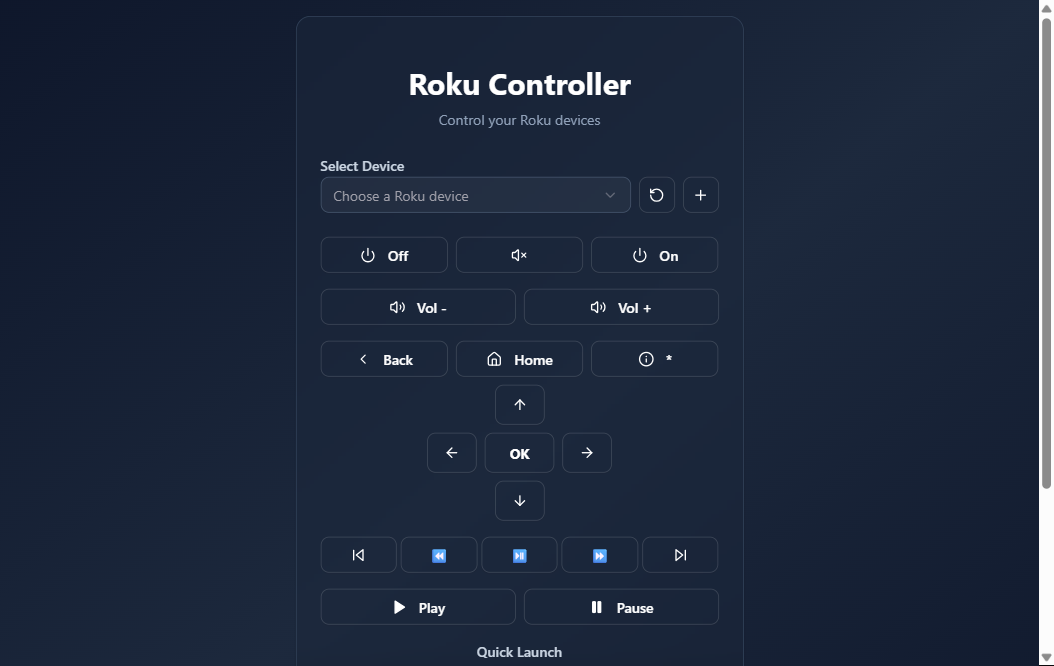
IP entry field + a live connection-test toast
SSDP discovery lines, then a "stored IP stale → rediscovering"
resolve-by-serial trace
08 Honest status
Working, and running as a Docker container on my home server's host network (port 8094), in continuous LAN service since February 2026. It is deliberately LAN-only with no authentication — every procedure is public, scoped to a trusted home network — so it should not be exposed to the internet as-is: anyone who could reach it could control the TVs and read device serials and MAC addresses. For the record, this one was built with the Manus AI coding agent rather than Claude; the point of this résumé is AI-assisted work in general, so it belongs alongside the rest. It also still carries a fair amount of unused scaffolding from that template — the abandoned database table, plus generated UI and service modules — which I left in place rather than spend time pruning a home utility down to just the Roku code. Test coverage is thin: there is one template auth test and no Roku-specific tests. It is a modest, useful appliance, not a hardened product — but the serial-keyed device model is a real fix that has kept it working through every lease change since. Update (2026-08-02): a runnable, de-identified clone (Steps to Build tab) now exists — the real Roku logic plus a small mock-Roku service that answers the device's control endpoints, so the whole thing demos with no hardware and no real device data. It was verified end-to-end: selecting a seeded demo TV and pressing a button routed the command through to the mock.
09 Try it
Two ways, depending on whether you have a Roku handy. Neither involves my devices — the hosted demo is fully simulated, and the local file talks only to an IP you type.
Hosted demo ↗
The real app driving three simulated Rokus (the same mock service the clone uses for testing). Every press gets a delivery confirmation; adding devices is disabled there.
roku-lite-remote.html
A single HTML file — download it, open it from your computer on the same network, type the Roku's IP, and the buttons drive your actual TV. One-way by nature (browsers block reading the replies), no install, and the page makes no requests except to that IP. Chrome/Edge/Firefox; Safari may refuse.
roku-remote — Build Recipe
Take a bare machine to a running web-based Roku remote: a phone-friendly single-card UI backed by an Express + tRPC server that discovers Roku devices, controls them over Roku's External Control Protocol (ECP), quick-launches 13 streaming channels, and tracks each device by serial number so control keeps working even after the TV's DHCP IP changes. Runs with no real hardware, no keys, and no SSDP multicast — a small bundled mock Roku plays the part of the TVs so the whole thing is demoable on any Docker host.
Status: ✅ Verified 2026-08-02 — built from this clone on a Linux Docker host (
docker compose up -d --build). Both services came up healthy; the web app served on:8094and its seeded fake devices (Living Room / Bedroom / Kitchen) populated the picker with no real hardware and no SSDP. A real-browser pass selected a device and pressed Home, and the mock Roku received the ECP keypress end-to-end (Living Room Roku <- keypress Home), with 0 console errors. All three tiers covered; the prebuilt tarball (docker save roku-remote-clone roku-remote-mock-clone) is ~430 MB.Sensitive data: none. The four real household Rokus (names, LAN IPs, serials, MACs) were replaced with invented devices; the Manus OAuth/JWT scaffolding was stripped; the app runs key-free and device-free.
Sensitive data: none in this clone. The personal version stored four real household Rokus (names including a family surname, LAN IPs, serial numbers, MAC addresses) in a device file, carried a hardcoded
JWT_SECRET, and pointed at the Manus OAuth platform. All of that is replaced with three invented demo devices served by the mock, and every Manus/auth/database scaffold was removed or neutralized. See What was stripped.
What it is
Two small services on one compose network:
| Service | Role |
|---|---|
roku-controller (repo root) |
the product — a React 19 + tRPC 11 + Express app. Discovers devices, sends the 21 remote commands + 13 channel launches over ECP, persists devices in a serial-keyed JSON file, serves the remote UI on :8094. |
mock-roku (mock-roku/) |
a stand-in for real Roku TVs. Answers the three ECP endpoints the app calls (/query/device-info, /keypress/:cmd, /launch/:id) for three fake devices — so the clone needs no TV, no LAN multicast, and no host networking. |
Stack: TypeScript throughout, tRPC over HTTP (superjson), node-ssdp for
discovery, axios for ECP, Tailwind 4 + shadcn/ui for the single remote card.
No GPU, no database, no API keys.
Prerequisites
New machine? See ../SETUP.md for Docker. Then, per tier:
| Tier | You need |
|---|---|
| 1 — prebuilt containers (recommended) | Docker + this bundle's clone/ folder (for the compose file). |
| 2 — build from source | Same as Tier 1. |
| 3 — bare-metal | Node 20.11+ (for import.meta.dirname; Node 22 recommended) (two processes: the app and the mock). |
Configuration — nothing required
Runs key-free and device-free out of the box. The three demo Rokus are
seeded into the device store on first boot, and their serial numbers match what
the mock reports — so the app's serial-keyed fast path resolves them live with
no real TV. Everything is env-overridable (clone/.env.example), but the
defaults in docker-compose.yml need no editing.
Tier 1 — Run the prebuilt containers (recommended)
Availability: the prebuilt image bundle is available on request — it is not published or linked anywhere. Ask Kevin for it, or build from source via Tier 2 below.
docker load -i roku-remote-clone-image.tar   # loads both images
cd clone
docker compose up -d                         # → http://localhost:8094
Tier 2 — Build from source
cd clone
docker compose up -d --build                 # → http://localhost:8094
curl -s localhost:8094/health                # → {"status":"ok"}
Open http://localhost:8094. The device dropdown is already populated with
the three demo Rokus. Pick one, then press buttons — the mock logs each keypress
(docker compose logs -f mock-roku), and the UI toasts success/failure exactly
as it would against a real TV.
Tier 3 — Bare-metal (two Node processes)
cd clone

# 1) the mock Roku (answers ECP on :8060)
cd mock-roku && npm install --omit=dev && node server.js &      # → :8060
#   The three demo devices are addressed by hostname; for a single-host bare-metal
#   run, point one seed device at localhost (see note below).

# 2) the controller
cd ..
npm install --legacy-peer-deps
npm run build                                                    # vite + esbuild
ROKU_SSDP_ENABLED=false \
ROKU_SEED_HOSTS=127.0.0.1 \
ROKU_STORAGE_PATH=./data/roku-devices.json \
PORT=8094 npm start                                              # → http://localhost:8094
On bare metal the compose network aliases (roku-bedroom, …) don't exist, so
the mock's three devices all answer on 127.0.0.1:8060 and the app resolves
whichever one the Host header selects (it defaults to the living-room device).
The Docker path is the honest multi-device demo; bare-metal is the "it's just
two Node processes" proof. On Windows, set the env vars with $env: first.
Optional: point it at your real Rokus
This is the whole reason the project exists. To drive actual TVs instead of the mock:
- Run the controller with host networking (so it can send SSDP multicast on
UDP 1900) and enable discovery:
yaml
   # docker-compose.override.yml
   services:
     roku-controller:
       network_mode: host
       environment:
         - ROKU_SSDP_ENABLED=true
(Drop themock-rokuservice and theports:mapping when using host networking.) - Or skip SSDP entirely and list your TVs' LAN IPs:
ROKU_SEED_HOSTS=192.168.1.50,192.168.1.51, or add them one at a time with the + button in the UI (enter the IP; it connects, reads the serial, and saves it).
Either way ROKU_ECP_PORT stays at the Roku default of 8060. Once a device
is stored by serial, its IP can change freely and control still works.
Provenance — data & devices
No datasets, no models, no keys. mock-roku/server.js and seed/roku-devices.json
contain three invented devices with fake, self-consistent names, models,
serial numbers, and MAC addresses (DEMOROKU0001…3, aa:bb:cc:00:00:0x). The
channel IDs in shared/rokuChannels.ts are Roku's public, well-known
app IDs (Netflix 12, YouTube 837, Jellyfin 592369, …) — not personal data.
What was stripped from the personal version (de-identification)
- The real household Rokus — the live device file held real device names
(one revealing a family surname), LAN IPs, serial numbers, and MAC addresses,
and the
discover/addDeviceAPI returned them to any LAN client with no auth. Replaced entirely with the three invented mock devices. - The hardcoded seed IP baked into the discovery fallback (a fixed real
home-LAN address) → replaced with an env-driven
ROKU_SEED_HOSTSlist (empty by default, pointed at the mock in compose). - A hardcoded
JWT_SECRETand the Manus OAuth platform dependency → removed; the clone has no auth layer and makes no external calls. (The app is LAN-only by design; see limitations.) - The dead database layer — a
drizzle-orm/mysql2schema plus a bogusDATABASE_URL=file:/app/data/roku.db(a SQLite URL pointed at a MySQL driver that never connected). Persistence was always the JSON file; the DB code and env var are gone. - The Manus template scaffolding the app was generated inside — the unused
_coreLLM / voice / map / image-generation modules, the OAuth/JWT session plumbing, the vite Manus-runtime plugin and 800-line browser debug collector, and ~45 unused shadcn components /ComponentShowcase/ demo pages. Kept only the shadcn primitives the remote actually uses (button, card, dialog, input, label, select, sonner, tooltip). - The hardcoded ECP port (
:8060in three places) → parameterized viaROKU_ECP_PORTso the app can be aimed at the mock, and SSDP was made opt-in (ROKU_SSDP_ENABLED, default off) so the clone runs on a plain bridge network instead of requiring host networking. - Added a plain
GET /healthroute (the original's healthcheck curled one that only existed as a tRPC procedure).
Known limitations (stated honestly)
- No authentication — like the original, every procedure is public. This is a trusted-LAN tool; don't expose it to the internet as-is (anyone who reaches it could control the TVs and read device serials/MACs).
- The mock is a stand-in, not a Roku. It returns valid ECP
device-infoand 200s every keypress/launch, but there's no on-screen effect to see — the demo proves the control path (discovery → serial resolution → ECP call), not a picture on a TV. The real payoff is pointing it at hardware. - Bare-metal collapses the three devices onto one host (
127.0.0.1:8060), since the multi-device illusion relies on docker-compose network aliases. Use the Docker path for the full three-device dropdown. Searchis wired but has no button, andremoveRokuDeviceexists with no UI — both carried over faithfully from the original as-is.
The engineering story (why this is worth showing)
The signature lesson came from a real failure: button presses silently stopped working because the Rokus picked up new DHCP leases, and the app had been keyed on IP address. The fix — carried into this clone verbatim — is to make the serial number the stable identity end to end:
- The UI addresses commands by
serialNumber, never IP (the dropdown doesn't even show IPs). resolveDeviceIP(serial)runs a fast path / slow path: try the stored IP and verify it still reports the expected serial viadevice-info; if it's stale, run full re-discovery, match by serial, update the stored IP, then send the command. So a TV that moved to a new IP is silently re-found on the next press.- Discovery itself is a fallback chain: SSDP
M-SEARCH roku:ecp(filtered by theRokuSERVER header) when enabled, degrading to a known-host scan and a seed list. ECP XML is parsed by a handful of regexes — no XML library — because only four fields matter.
The mock exists to make all of that observable without a TV: three fake devices behind docker-compose network aliases let the controller resolve each one by host exactly as it would by IP on a real LAN, so the serial-keyed fast path, the stale-IP re-resolution, and the ECP request/response are all exercised end to end, key-free and hardware-free.
The original was generated with the Manus AI agent (not Claude); this clone keeps the first-party Roku logic and rebuilds everything around it as a clean, self-contained, key-free project.
Demo mode (added 2026-08-09 — powers the public hosted demo)
Dockerfile.demo builds the controller and the bundled mock-roku into one container
for single-container hosts (no docker network aliases there): the three simulated devices
live on loopback IPs 127.0.0.1/2/3 (all of 127/8 answers on Linux — no DNS, no
/etc/hosts, which hosted runtimes may not let you write), and the mock maps each IP back
to a device via the generic MOCK_ROKU_HOST_ALIASES env added to mock-roku/server.js.
seed/roku-devices.demo.json seeds those IPs. The demo build also sets
ROKU_ADD_DEVICE_DISABLED=true (the add-by-IP probe is an SSRF primitive on a public
host) and bakes VITE_DEMO_BANNER=1 into the client. Keypresses now toast a delivery
confirmation (useful on real hardware too — ECP has no on-screen ack).
docker build -f Dockerfile.demo -t roku-demo .
docker run -p 8094:8094 roku-demo
The compose stack and normal Dockerfile are unchanged. An optional build-ca.pem
beside the Dockerfile supports TLS-inspecting networks (used in throwaway build stages
only; never ships in the final image).
Related: roku-lite-remote.html on the resume site is a separate zero-install,
single-file remote for REAL Rokus (file:// page sending no-cors ECP POSTs) — not part of
this codebase, noted here for the full picture.